CRM HubSpot / Integration / Doesn't show up Contacts

Status
Not open for further replies.

MatthewMartins

Free User
Joined
Jan 6, 2022
Messages
6
Reaction score
0
Hi, first time posting here.

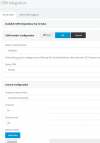
So I've already done the integration following this tutorial < https://www.3cx.com/docs/hubspot-pbx-crm-integration/ >, the problem is doens't show the contatcts from our Hubspot.
I did the the test here :
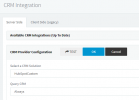
1641581954709.png

This is what happens:
1641582147284.png
Any idea what it might be? Did I miss a step?
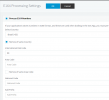
About E164 both are the same, set for my country.

Well thanks for your time and willingness
Kind regards.
 

Attachments

  • 1641582130838.png
    1641582130838.png
    70.1 KB · Views: 22
2 things:

1. Why "HubSpotCustom"? There's a template already built-in the system.

2. You are trying to test with 4-digits, so it won't work. HubSpot only supports exact match when searching the API. So, everything should be E164 and so should be your test.
 
Hi @ConceptsWeb .
1 It was actually one of the tests I did on the forum, which was the bug about the integration not working.
2 I'm not testing with 4 digits, it's just that I removed the number because it's a sensitive data.

I also saw that hubspot doesn't allow incomplete search, so I already put it to be identical. "Match exactly"
 
Start by using the main template which should work fine with the new scopes.

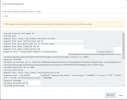
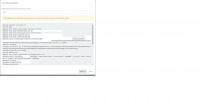
Also, show us the log but below what we see in your screenshot (like after GetPortalID)
 
Ok, done.
1641585352192.png

Request text: https://api.hubapi.com/integrations/v1/me
Response text: {"portalId":21120963,"timeZone":"America/Sao_Paulo","accountType":"STANDARD","currency":"USD","utcOffset":"-03:00","utcOffsetMilliseconds":-10800000}
Response finished
Variable PortalID set to 21120963
Finished GetPortalID
Finished Auth
Request text: https://api.hubapi.com/crm/v3/objects/contacts/search
Request message: {"properties":["firstname","lastname","company","email","phone","mobilephone","fax"],"filterGroups":[{"filters":[{"propertyName":"phone","operator":"EQ","value":"551532634018"}]},{"filters":[{"propertyName":"mobilephone","operator":"EQ","value":"551532634018"}]},{"filters":[{"propertyName":"fax","operator":"EQ","value":"551532634018"}]}]}
Response text: {"total":0,"results":[]}
Response finished
Finished scenario with empty id
Started scenario with empty id
Request text: https://api.hubapi.com/crm/v3/objects/companies/search
Request message: {"properties":["name","phone"],"filterGroups":[{"filters":[{"propertyName":"phone","operator":"EQ","value":"551532634018"}]}]}
Response text: {"total":0,"results":[]}
Response finished
Finished scenario with empty id
 
Just to check about the E164.
1641586176820.png

Thanks again @ConceptsWeb for your effort!
 
When you test, do you test with a +55 number? I see it removes the + for some reason, which it shouldn't.
 
Yes I do the test with +55, 55 and without.
 
I also asked support for help, I think on Monday I'll have a better position and notion of what it can be.
 
If you wish, DM me an admin extension credentials (so you can delete it afterwards) and a number that is 100% valid in HubSpot and without spaces or dashes or anything else.

I'll take a quick look.
 
Status
Not open for further replies.

Forum statistics

Threads
112,147
Messages
590,961
Members
165,167
Latest member
Finatra.us