CRM Integration - API Key & raw Json Data

Status
Not open for further replies.

ReeceWallace

Platinum Partner
Advanced Certified
Joined
Nov 20, 2019
Messages
25
Reaction score
10
Hi,

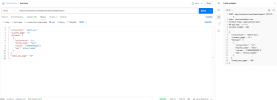
I am experiencing two issues with CRM integration and would appreciate if someone could let me know where I am going wrong? I have attached my XML and screenshots below of my working Postman requests.

The issue is that the test on 3CX returns with must supply API key. I have adjusted my header to both APIKey and also tried RF-Api-Key as the header key.

I am also not sure that my configuration for the Raw Json Data is correct.

Any help would be great!

Postman Example --

POST /api/external/candidate/search HTTP/1.1
Host: recruiterflow.com
Content-Type: application/json
RF-Api-Key: ••••••
Content-Length: 230

{
"conjunction": "match-all",
"current_page": "1",
"filters": [
{
"conjunction": "in",
"filter_type": "text",
"values": ["02031952222"],
"key": "phone_number"
}
],
"items_per_page": "50"
}
 

Attachments

I have made an adjustment but this still doesn't seem to be working correctly and is not finding the number. Below is my XML and Also the Log from the system file.
<Scenarios>
<Scenario Id="" Type="REST">
<Request Url="https://recruiterflow.com/api/external/candidate/search"
MessagePasses="0"
RequestContentType="application/json"
RequestType="Post"
ResponseType="Json">

<Headers>
<Value Key="RF-Api-Key"><MY API KEY></Value>
</Headers>

<PostValues>
<Value Key="conjunction" Type="String">match-all</Value>
<Value Key="current_page" Type="String">1</Value>
<Array Key="filters">
<Object>
<Value Key="conjunction" Type="String">in</Value>
<Value Key="filter_type" Type="String">text</Value>
<Array Key="values">
<Value Type="String">[Number]</Value>
</Array>
<Value Key="key" Type="String">phone_number</Value>
</Object>
</Array>
<Value Key="items_per_page" Type="String">50</Value>
</PostValues>
</Request>

LOG

2024/08/29 13:46:16.964|0046|Debg| [Integration.Crm.Engine.SearchNumberScenarioProcessor] CRM: Performing POST request to 'https://recruiterflow.com' with following form values:
2024/08/29 13:46:16.964|0046|Debg| [Integration.Crm.Engine.SearchNumberScenarioProcessor] CRM: 'conjunction' = 'match-all'
2024/08/29 13:46:16.964|0046|Debg| [Integration.Crm.Engine.SearchNumberScenarioProcessor] CRM: 'current_page' = '1'
2024/08/29 13:46:16.964|0046|Debg| [Integration.Crm.Engine.SearchNumberScenarioProcessor] CRM: 'items_per_page' = '50'
2024/08/29 13:46:16.964|0046|Info| [_3CX.HttpClient] Sending 'POST' to 'https://recruiterflow.com/api/external/candidate/search'
2024/08/29 13:46:16.965|0005|Debg| Enqueue Updated.CONNECTION.153
2024/08/29 13:46:16.968|0046|Debg| Dequeue Updated.CONNECTION.153
2024/08/29 13:46:17.481|0046|Info| [_3CX.HttpClient] Received '400 BadRequest' after 516.9ms
2024/08/29 13:46:17.483|0046|Erro| [Integration.Crm.Engine.CrmProcessor] CRM: Exception executing contact lookup for number '07492047292'
System.Exception: Server returned a non successful status code - HTTPStatusCode=BadRequest - Reason=BAD REQUEST - Content=<!doctype html>
<html lang=en>
<title>400 Bad Request</title>
<h1>Bad Request</h1>
<p>The browser (or proxy) sent a request that this server could not understand.</p>
 
I have made an adjustment but this still doesn't seem to be working correctly and is not finding the number. Below is my XML and Also the Log from the system file.
<Scenarios>
<Scenario Id="" Type="REST">
<Request Url="https://recruiterflow.com/api/external/candidate/search"
MessagePasses="0"
RequestContentType="application/json"
RequestType="Post"
ResponseType="Json">

<Headers>
<Value Key="RF-Api-Key"><MY API KEY></Value>
</Headers>

<PostValues>
<Value Key="conjunction" Type="String">match-all</Value>
<Value Key="current_page" Type="String">1</Value>
<Array Key="filters">
<Object>
<Value Key="conjunction" Type="String">in</Value>
<Value Key="filter_type" Type="String">text</Value>
<Array Key="values">
<Value Type="String">[Number]</Value>
</Array>
<Value Key="key" Type="String">phone_number</Value>
</Object>
</Array>
<Value Key="items_per_page" Type="String">50</Value>
</PostValues>
</Request>

LOG

2024/08/29 13:46:16.964|0046|Debg| [Integration.Crm.Engine.SearchNumberScenarioProcessor] CRM: Performing POST request to 'https://recruiterflow.com' with following form values:
2024/08/29 13:46:16.964|0046|Debg| [Integration.Crm.Engine.SearchNumberScenarioProcessor] CRM: 'conjunction' = 'match-all'
2024/08/29 13:46:16.964|0046|Debg| [Integration.Crm.Engine.SearchNumberScenarioProcessor] CRM: 'current_page' = '1'
2024/08/29 13:46:16.964|0046|Debg| [Integration.Crm.Engine.SearchNumberScenarioProcessor] CRM: 'items_per_page' = '50'
2024/08/29 13:46:16.964|0046|Info| [_3CX.HttpClient] Sending 'POST' to 'https://recruiterflow.com/api/external/candidate/search'
2024/08/29 13:46:16.965|0005|Debg| Enqueue Updated.CONNECTION.153
2024/08/29 13:46:16.968|0046|Debg| Dequeue Updated.CONNECTION.153
2024/08/29 13:46:17.481|0046|Info| [_3CX.HttpClient] Received '400 BadRequest' after 516.9ms
2024/08/29 13:46:17.483|0046|Erro| [Integration.Crm.Engine.CrmProcessor] CRM: Exception executing contact lookup for number '07492047292'
System.Exception: Server returned a non successful status code - HTTPStatusCode=BadRequest - Reason=BAD REQUEST - Content=<!doctype html>
<html lang=en>
<title>400 Bad Request</title>
<h1>Bad Request</h1>
<p>The browser (or proxy) sent a request that this server could not understand.</p>
Enable verbose logging, run a few tests then check the SupportInfo for the 3CXSystemService.log file. Search for "CRM:" in there, you'll see the finalized request/reponse.
 
I am completely lost here,

My postman works, I've tried implementing that into the XML as per other examples and I am still getting 400 Bad Request but I'm not seeing the full input on the System service log, like its skipping the Filter list?. Any assistance on this would be a massive help. Thank you in advance.

1725026307477.png

<Scenario Id="" Type="REST">
<Request Url="https://recruiterflow.com/api/external/candidate/search" MessagePasses="0" RequestEncoding="UrlEncoded" RequestType="Post" ResponseType="Json" >
<Headers>
<Value Key="RF-Api-Key">MYAPI</Value>
<Value Key="User-Agent">3cxintegration</Value>
</Headers>
<PostValues Key="">
<Value Key="conjunction" Type="String">match-all</Value>
<Value Key="current_page" Type="String">1</Value>
<Object Key="filter">
<Value Key="conjunction" Type="String">in</Value>
<Value Key="filter_type" Type="String">text</Value>
<Value Key="values" Type="String">{{[Number]}}</Value>
<Value Key="key" Type="String">phone_number</Value>
</Object>
<Value Key="items_per_page" Type="String">50</Value>
</PostValues>
</Request>

2024/08/30 14:50:47.030|0059|Debg| [Integration.Crm.Engine.NoAuthHttpClientProvider] CRM: Creating new HttpClient with no authentication
2024/08/30 14:50:47.030|0059|Debg| [Integration.Crm.Engine.SearchNumberScenarioProcessor] CRM: Performing POST request to 'https://recruiterflow.com' with following form values:
2024/08/30 14:50:47.031|0059|Debg| [Integration.Crm.Engine.SearchNumberScenarioProcessor] CRM: 'conjunction' = 'match-all'
2024/08/30 14:50:47.031|0059|Debg| [Integration.Crm.Engine.SearchNumberScenarioProcessor] CRM: 'current_page' = '1'
2024/08/30 14:50:47.031|0059|Debg| [Integration.Crm.Engine.SearchNumberScenarioProcessor] CRM: 'items_per_page' = '50'
2024/08/30 14:50:47.031|0059|Info| [_3CX.HttpClient] Sending 'POST' to 'https://recruiterflow.com/api/external/candidate/search'
2024/08/30 14:50:47.032|0005|Debg| Enqueue Updated.CONNECTION.186
2024/08/30 14:50:47.047|0059|Debg| Dequeue Updated.CONNECTION.186
2024/08/30 14:50:47.498|0059|Info| [_3CX.HttpClient] Received '400 BadRequest' after 466.7ms
2024/08/30 14:50:47.501|0059|Erro| [Integration.Crm.Engine.CrmProcessor] CRM: Exception executing contact lookup for number '07492047292'
System.Exception: Server returned a non successful status code - HTTPStatusCode=BadRequest - Reason=BAD REQUEST - Content=<!doctype html>
<html lang=en>
<title>400 Bad Request</title>
 
Hi All!

Finally got the post request working as it should, using an Array. If anyone wants to know what I did drop me a message!

My next issue is the Json response I am receiving isn't allowing me to populate the PhoneBusiness Variable appropriately.

the Response is

"phone_number": [
"02031952222",
"02031952234",
"07492047292",
"07543329766"

But I am not sure how to appropriately differentiate between the returned numbers in the variables, or if this is even possible.

I've used the output for PhoneBusiness2 set to [Number] as a workaround but hopefully this isn't the only way moving forward.
 
  • Like
Reactions: Evolute IT
You can't get a value from an array if you don't use a selector, but as you only have the value you can't do that, so not possible....
The only workaround is doing what you are doing with the PhoneBusiness2 output.
 
You can't get a value from an array if you don't use a selector, but as you only have the value you can't do that, so not possible....
The only workaround is doing what you are doing with the PhoneBusiness2 output.
Thought so!

Back to the CRM to see if I can get them to update the response.

Thanks for your assistance!
 
Status
Not open for further replies.