CRM Integration doesn't open ContactUrl automatically

Status
Not open for further replies.

startechinformatica

Silver Partner
Basic Certified
Joined
Jun 9, 2020
Messages
5
Reaction score
0
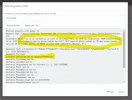
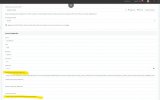
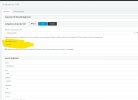
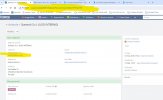
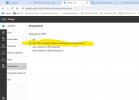
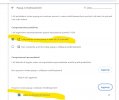
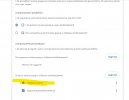
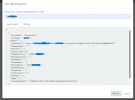
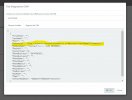
Good morning everyone, I encountered a problem with CRM integration via database query (see attached images).

Let me try to explain: once I receive the call on 3CX, the query is successful and finds the record in the CRM database (EspoCRM), correctly populates the ContactID field with the right value, correctly composes the ContactUrl link (which if I copy on a browser points exactly to the customer's record on CRM), but it does NOT open it anymore automatically (until some time ago it did...)!!!

What am I doing wrong? What am I missing to check?

Thank you in advance, have a good evening everyone.
 

Attachments

  • Immagine 2024-05-23 161136.jpg
    Immagine 2024-05-23 161136.jpg
    83 KB · Views: 47
  • Immagine 2024-05-23 161221.jpg
    Immagine 2024-05-23 161221.jpg
    125 KB · Views: 43
  • Immagine 2024-05-23 161317.jpg
    Immagine 2024-05-23 161317.jpg
    170.1 KB · Views: 34
  • Immagine 2024-05-23 161411.jpg
    Immagine 2024-05-23 161411.jpg
    124.3 KB · Views: 32
  • Immagine 2024-05-23 161520.jpg
    Immagine 2024-05-23 161520.jpg
    173.4 KB · Views: 42
Do you have the Webclient opened or PWA/DesktopApp running? It is needed to open the URL.

Also, make sure that in the one you use, the auto-open is enabled under ... > Settings > Integration.
 
the webclient is open (chrome browser) and in settings->integration is selected "open contact url using server side crm integration", but it doesn't work...
 

Attachments

  • Immagine 2024-05-23 171131.jpg
    Immagine 2024-05-23 171131.jpg
    116.7 KB · Views: 27
the webclient is open (chrome browser) and in settings->integration is selected "open contact url using server side crm integration", but it doesn't work...
Could a popup block be happening in Chrome?
 
no, no popup blocked...
 

Attachments

  • Immagine 2024-05-23 172431.jpg
    Immagine 2024-05-23 172431.jpg
    84.7 KB · Views: 27
You need to allow the Webclient to popup pages, not the CRM.
 
Idem, as before...
 

Attachments

  • Immagine 2024-05-23 173032.jpg
    Immagine 2024-05-23 173032.jpg
    70.6 KB · Views: 23
Does the CRM link appears in the dialer when the call is active? If you click on it, does it open the right page?
 
Same for me.
I moved the 3cx and crm on a new server, keeping same file system path, url, and so on.
Just the pop up do not work.
CRM integration test from the management console works as usual
Any suggestion ?
 
Same for me.
I moved the 3cx and crm on a new server, keeping same file system path, url, and so on.
Just the pop up do not work.
CRM integration test from the management console works as usual
Any suggestion ?
Maybe a popup blocker in the browser?
 
Maybe a popup blocker in the browser?
At the client side nothing changed, and before moving the server side popups was working.
Anyway popups are enabled. Also I tried both PWA and web client, and the windows softphone
On the server side the crm integration works
Running V 18 update 9
 

Attachments

  • Screenshot 2024-06-13 145907.png
    Screenshot 2024-06-13 145907.png
    45.2 KB · Views: 21
  • Screenshot 2024-06-13 143600.png
    Screenshot 2024-06-13 143600.png
    34.3 KB · Views: 20
Hello,

I am experiencing a similar problem.
At a customer with a customized CRM integration, 3CX v20u1 Pro Self-Hosted, Build 731 Release :
On an incoming call, the CRM Lookup goes fine, the record is created in the "CRM" directory, and the link appears during the ring, as well as on the directory record.
But when you pick up the phone, the CRM customer card doesn't open automatically, even though the PWA client is set to "Open Contact URL using Server Side CRM Integration".

I set up exactly the same integration on another 3CX server, same version (v20u1), Self-Hosted, in Build 731 Release, but with an Enterprise license: Everything works.

Unless I'm mistaken, automatic CRM url opening is supposed to work with the Pro license, isn't it?
Because that's clearly the one and only difference between the two 3CX servers tested... And in Pro, it's impossible to open the url automatically when the call is picked up, whereas it works with Enterprise licence!

Thanks in advance for your feedback.

Translated with www.DeepL.com/Translator (free version)
 
  • Like
Reactions: Acribia
The PRO license is enough for this. Check if the browser is blocking the popup. Also, check with a different browser, or a different extension and confirm if the issue is with this particular user only.
 
  • Like
Reactions: Acribia
The PRO license is enough for this. Check if the browser is blocking the popup. Also, check with a different browser, or a different extension and confirm if the issue is with this particular user only.
The tests were carried out on the same machine, the same browser (Chrome), with the same settings (especially for popup windows), etc. In short, the only difference I found was the license...
 
Please note that the URL is different when you access different PBX servers. So the popup blocker could be set for one site but not for the other. This is the most likely cause for this.
 
Please note that the URL is different when you access different PBX servers. So the popup blocker could be set for one site but not for the other. This is the most likely cause for this.
I know, I thought of that, and I did check each setting one by one between the two 3CX clients, including the Chrome settings for each of the two 3CX URLs.
 
Test carried out today with the DesktopApp: same conclusion.
With a pro license, it doesn't work, with an enterprise license, it does...
 
  • Like
Reactions: Acribia
I solved.
Almost sure it was a problem of browser cache.
After I cleared the cache, the popups reappear.
 
I solved.
Almost sure it was a problem of browser cache.
After I cleared the cache, the popups reappear.
Yes, it's always good to test in an incognito window to discard cache issues.
 
  • Like
Reactions: Acribia
Yes, it's always good to test in an incognito window to discard cache issues.
We thought about it and tested in incognito mode, but in our case with 3CX v20, it makes no difference... :(
 
Status
Not open for further replies.