CRM Integration, Open Contact URL, Desktop Client

Status
Not open for further replies.

johngibson83

Free User
Joined
Mar 10, 2020
Messages
21
Reaction score
0
Hi, hopefully someone can help. I think I'm probably missing something obvious.

We have CRM integration working in the WebClient but I can't seem to make it work with the desktop client. I see the option to configure when to open the contact under advanced settings->integration but when I do answer a call nothing happens.

I have found a very old visual studio extension on the visual studio marketplace and I'm wondering if that is actually a necessary step to make it work? It isn't compatible with anything later than 2015...

John
 
Hi, hopefully someone can help. I think I'm probably missing something obvious.

We have CRM integration working in the WebClient but I can't seem to make it work with the desktop client. I see the option to configure when to open the contact under advanced settings->integration but when I do answer a call nothing happens.

I have found a very old visual studio extension on the visual studio marketplace and I'm wondering if that is actually a necessary step to make it work? It isn't compatible with anything later than 2015...

John

The desktop client only supports the client-side integrations, which are legacies.

The new CRM integration (server-side) only works on the Webclient and the browser extension. Not on desktop clients nor mobile apps.
 
Thanks Frederick,

Can I take that to mean the visual studio template is still supported? The only reason we are using the desktop client is that we can't seem to find an option on the web client to have the agent automatically answer the call, is there such an option?

John
 
Just to summarize in the hope of making a simple yes/no answer possible:

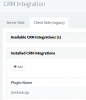
Does the client side CRM integration still work? (Even if it is not officially supported, I see outlook and DATEV available but the aren't downloaded even when I install them on the server and restart the client)

Is having the agents automatically answer calls on the web client/extension possible in the same way it is for the desktop client?

1590482397936.png
 
Does the client side CRM integration still work? (Even if it is not officially supported, I see outlook and DATEV available but the aren't downloaded even when I install them on the server and restart the client)
Yes, they still work, and we use them as you pointed out for Outlook and DATEV. However, the recommended approach is the server side integration.

The Visual Studio template you mentioned creates a client side plugin, and it's no longer supported by 3CX. If you want to use it, you would have to install Visual Studio 2015, because it will not work with other version.

Is having the agents automatically answer calls on the web client/extension possible in the same way it is for the desktop client?
No, this option is not available in the Web Client. However, you can use both clients at the same time. For example, you can use the Windows client in softphone mode, and the Web Client in CTI mode. This way, you get the integration capabilities with the Web Client, while you still have the auto-answer feature that you need from the Windows client.
 
  • Like
Reactions: Evolute IT
While the old template doesn't work, you can still build a plugin yourself. We don't offer any plugins anymore because I'm personally not sure how long 3CX will include the plugin technology in 3CX Phone for Windows. However, Ernesto's point suggests that it may be around for some time given the Outlook integration requires it. But I'm still a little uneasy on the subject.

For many of our solutions we are moving to our own independent client solution where our application listens to 3CX events and takes actions (screen pops, inserting records into the CRM, etc.). This gives us complete control over the user-interface and application capabilities and doesn't rely on any of the 3CX client technologies.

I would prefer to leverage the existing client technologies, but there is no API for manipulating (adding features for example) to either of the client's interface (web or Windows) so we just build our own interfaces when required.

There are almost always multiple ways to accomplish a task.
 
Thanks Ernesto, Matthew,

I'll try the softphone/CTI mode combo, it seems like the most future-proof option.

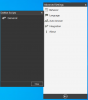
I appreciate that it's not supported so feel free to ignore question but I've installed VS 2015 and created a plugin and I'd really like to see it working. The desktop client doesn't download even the Outlook plugin and I don't know why, am I doing something completely wrong?1590565967941.png
1590565959161.png
 
In order to use the Outlook integration, you need to do the following:
1) Download the integration from the 3CX Console > Settings > CRM Integration > Client side. I see that you have done this.
2) Go to the 3CX Console > Extensions > edit your extension > Options > Enable the legacy integration and select Outlook.

Once you do this, when you restart 3CXPhone for Windows, it will reprovision and download the integration.

If you have a custom made plugin, you need to add it to the 3CX console, and then assign the integration to the extension.
 
Thanks Ernesto.
 
Status
Not open for further replies.

Forum statistics

Threads
112,326
Messages
591,899
Members
165,479
Latest member
Senergia