CRM integration refreshToken and sessionname

Yeslian

SOHO User
Joined
Nov 16, 2021
Messages
9
Reaction score
1
Currently I am troubleshooting, as mentioned earlier sometimes my vTiger contacts do get recognized but sometimes they dont.
Because the test option gives an error in v20 (in v18 the test worked fine) I gave the problem to AI:


The error System.InvalidOperationException: Sequence contains no matching element in the 3CX log indicates a mismatch between what the CRM integration expects (e.g., a refreshToken) and what your vTiger CRM actually returns (a sessionName). Here is the solution:


Cause of the Error​

The code of the 3CX CRM integration attempts to retrieve a refreshToken from the API response of vTiger, but vTiger only returns a sessionName. This occurs in the StoreAuthData method, where the code uses a LINQ query (such as .First() or .Single()) on an empty collection.


Solution​

1.​

The XML template is correctly configured for vTiger and already retrieves the sessionName (see the <GetSessionName> scenario). The issue lies in the underlying C# code of the integration.

What Needs to Be Done:

  • Search the code for all references to refreshToken (e.g., in StoreAuthData) and replace them with sessionName.
Example:

csharp

// Replace this:
var refreshToken = response["refreshToken"].First(); // CRASHES because "refreshToken" does not exist

// With this:
var sessionName = response["sessionName"].First(); // Use the field that DOES exist


Seems like this can't be done?
 
Your post is very confusing. Can you paste the actual error you're getting when you do your test in 3CX? Forget about what the AI said.
 
  • Like
Reactions: Evolute IT
Some background information: Recently I updated the 3cx system from version 18 to 20..
Until then all seemed to work fine.

With the same template I still use this day. The test butten then worked.

Now I get this error:

Code:
Started scenario with empty id
Started Auth
Request text: https://<siteURL>
Response text: ********
Response finished
Variable Token set to 679b3bcf11128
Started GetSessionName
Request text: https://<siteURL>
Request form value operation set to login
Request form value username set to <USER>
Request form value accessKey set to 84819b831061e202f0b8d9900ebc7c76
Response text: {"success":true,"result":{"username":"<USER>","first_name":"Q","last_name":"M","email":"[email protected]","time_zone":"Europe\/Brussels","hour_format":"12","date_format":"dd-mm-yyyy","is_admin":"on","call_duration":"5","other_event_duration":"5","sessionName":"2e591862679b3bcf17a52","userId":"19x6","version":"0.22","vtigerVersion":"7.3.0"}}
Response finished
Variable SessionName set to 2e591862679b3bcf17a52
Finished GetSessionName
Finished Auth
System.InvalidOperationException: Sequence contains no matching element
   at System.Linq.ThrowHelper.ThrowNoMatchException()
   at Integration.Crm.Engine.ScenarioAuthHttpClientProvider.StoreAuthData(ProcessingContext context, String refreshToken)
   at Integration.Crm.Engine.ScenarioAuthHttpClientProvider.PerformScenarioIfNeeded(CancellationToken token)
   at Integration.Crm.Engine.ScenarioAuthHttpClientProvider.Create(CancellationToken token)
   at Integration.Crm.Engine.ScenarioProcessorBase.ProcessScenario(ProtocolScenario scenario, IValueManager customManager, SqlQueryParameter[] sqlQueryParameter, CancellationToken token)
   at Integration.Crm.Engine.ScenarioProcessorBase.Execute(ProtocolScenario scenario, SqlQueryParameter[] sqlQueryParameter, CancellationToken token)
   at Integration.Crm.Engine.CrmProcessor.GetContactInfoFromCrm(List`1 result, IEnumerable`1 scenariosToProcess, IValueManager customManager, SqlQueryParameter[] sqlQueryParameters, Func`2 filterResultsFunctor, Boolean exactMatch, CancellationToken token)
   at Integration.Crm.Engine.CrmProcessor.GetContactInfo(String contactNumber, InteractionTypes interactionType, CancellationToken token)


- This is the result from the test with an existing phone nr.
- When making an inbound/outbound call the NR does get recognised.

- Although the template is working this is not always the case... sometimes the caller (with an existing number) gets recognised (name in the popup, and logged as call in our crm) but then the other time it doesnt.
This is why whe are troubleshooting, and for now we found this error from the test and the error in the logfile from the 3cx phone system.

I might be mistaken, but I seem to recall reading that with the update to v20, the authentication process for the CRM integration has changed..
 
V20 didn't change anything in the CRM integration.
 
It looks like you're using a very old version of the template, which uses a different authentication mechanism, through a GetChallenge method or something like that. Is your Vtiger the old on premise edition? That's not supported by 3CX since long time ago.
 
  • Like
Reactions: Evolute IT
Yeah, the crm I use is vTiger on premise... the open source version.

Tried the connection with an udated version of the CRM (8.3) but the same story repeats...


this is a part of the template:
<Scenario Id="Auth" Type="REST" EntityId="" EntityOrder="">
Request SkipIf="" Url="/webservice.php?operation=getchallenge&amp;username=[Username]" MessagePasses="0" Message="" RequestContentType="" RequestEncoding="UrlEncoded" RequestType="Get" ResponseType="Json" /> <Rules> <Rule Type="Any" Ethalon="">result.token</Rule> </Rules> <Variables> <Variable Name="Token" LookupValue="" Path="">result.token<Filter /></Variable> </Variables>

It works, but with some hiccups now and then... that why I started troubleshooting


(PS: this forum gives an 'oops, we rad in some problems' when trying to post the code..)
 
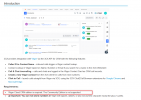
This is also clarified in the guideline here as the integration requires a Vtiger Cloud CRM:

2025-01-31_12h37_44.png
 
That old on-premise version has not been supported for a long time. You would need to develop a custom integration for that. Most of the API calls are the same, only the authentication changes. You would have to implement that change.