- Joined
- Jan 17, 2022
- Messages
- 3
- Reaction score
- 1
Hello
I am attempting to connect a 3CX instance to Zoho CRM
The instructions say to go to Settings > CRM Integration .> Server side tab
but there is no server side tab shown
I have tried looking around the forums for answers on this, other people with the same question have been advised to
Upgrade to Pro (Which I have done )
Reboot the 3CX instance (Which I have done)
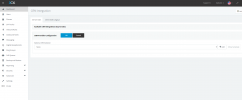
But there is no change to the menu, is is only showing a Client side (Legacy) tab
I could do with some advice / assistance on how to go about accessing the "Server side Tab" as I have run out of ideas from the things I have read
Regards
Lindsay
I am attempting to connect a 3CX instance to Zoho CRM
The instructions say to go to Settings > CRM Integration .> Server side tab
but there is no server side tab shown
I have tried looking around the forums for answers on this, other people with the same question have been advised to
Upgrade to Pro (Which I have done )
Reboot the 3CX instance (Which I have done)
But there is no change to the menu, is is only showing a Client side (Legacy) tab
I could do with some advice / assistance on how to go about accessing the "Server side Tab" as I have run out of ideas from the things I have read
Regards
Lindsay