- Joined
- Jul 17, 2024
- Messages
- 1
- Reaction score
- 0
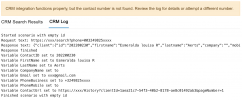
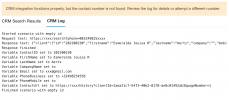
When I go to test my CRM integration, it says: "CRM integration functions properly, but the contact number is not found. Review the log for details or attempt a different number."
I'm sure I'm doing something dumb, but I'm not spotting it. When I review the logs I see this:
Started scenario with empty id
Request text: https://crm-odata-v1.prospect365.co...'1234567)&$select=DivisionId,Name,PhoneNumber
Response text: {
"@odata.context":"https://crm-odata-v1.prospect365.com/$metadata#Divisions(DivisionId,Name,PhoneNumber)","value":[
]
}
Response finished
Finished scenario with empty id
Started scenario with empty id
Request text: https://crm-odata-v1.prospect365.com/Contacts?$filter=contains(PhoneNumber,'1234567')
Response text: {
"@odata.context":"https://crm-odata-v1.prospect365.com/$metadata#Contacts","value":[
{
"ContactId":8785,"DivisionId":7858,"AddressId":7908,"MainAddressId":null,"DeliveryAddressId":null,"Individual":0,"RoleCode":"UNKNOW","Title":null,"Forename":"John","Surname":"Doe","PreferredName":null,"Salutation":"John","JobTitle":null,"Department":null,"PhoneNumber":"(1) (222) 1234567","Fax":null,"Email":"[email protected]","EmailBounced":0,"SecretaryName":null,"SecretaryPhone":null,"SecretaryEmail":null,"MailFlag":0,"FaxFlag":0,"EmailFlag":null,"SwapFlag":0,"SpokeCode":null,"SpokeDateTime":null,"DateOriginallyCreated":"2024-05-10T15:51:15.311415Z","SurnameSoundex":616,"ForenameSoundex":2917,"StatusFlag":"A","Source":null,"AlternateReference":null,"SearchTerms":null,"Created":"2024-05-10T15:51:15.311415Z","CreatedByUserId":"MS1","LastUpdated":"2024-05-10T15:55:29.022Z","LastUpdatedByUserId":"DBA","LastUpdatedTimestamp":"2024-05-11T09:06:50.847Z","SystemObjectsKey":"8785","SearchCached":1,"OptIn":0,"MobilePhoneNumber":null,"ImportSourceRunId":null,"RecordLink":"/view/Contact/8785","SystemSearchTerms":"John Doe","KlaviyoId":"","MergedWith":null,"AccountsId":null,"SyncFieldHash":null,"LastSyncError":null
}
]
}
Response finished
Variable ContactID set to 5555
Variable FirstName set to John
Variable LastName set to Doe
Variable CompanyName set to
Variable Email set to [email protected]
Variable PhoneNumber set to (1) (555) 1234567
Variable PhoneMobile set to
Finished scenario with empty id
I'm sure I'm doing something dumb, but I'm not spotting it. When I review the logs I see this:
Started scenario with empty id
Request text: https://crm-odata-v1.prospect365.co...'1234567)&$select=DivisionId,Name,PhoneNumber
Response text: {
"@odata.context":"https://crm-odata-v1.prospect365.com/$metadata#Divisions(DivisionId,Name,PhoneNumber)","value":[
]
}
Response finished
Finished scenario with empty id
Started scenario with empty id
Request text: https://crm-odata-v1.prospect365.com/Contacts?$filter=contains(PhoneNumber,'1234567')
Response text: {
"@odata.context":"https://crm-odata-v1.prospect365.com/$metadata#Contacts","value":[
{
"ContactId":8785,"DivisionId":7858,"AddressId":7908,"MainAddressId":null,"DeliveryAddressId":null,"Individual":0,"RoleCode":"UNKNOW","Title":null,"Forename":"John","Surname":"Doe","PreferredName":null,"Salutation":"John","JobTitle":null,"Department":null,"PhoneNumber":"(1) (222) 1234567","Fax":null,"Email":"[email protected]","EmailBounced":0,"SecretaryName":null,"SecretaryPhone":null,"SecretaryEmail":null,"MailFlag":0,"FaxFlag":0,"EmailFlag":null,"SwapFlag":0,"SpokeCode":null,"SpokeDateTime":null,"DateOriginallyCreated":"2024-05-10T15:51:15.311415Z","SurnameSoundex":616,"ForenameSoundex":2917,"StatusFlag":"A","Source":null,"AlternateReference":null,"SearchTerms":null,"Created":"2024-05-10T15:51:15.311415Z","CreatedByUserId":"MS1","LastUpdated":"2024-05-10T15:55:29.022Z","LastUpdatedByUserId":"DBA","LastUpdatedTimestamp":"2024-05-11T09:06:50.847Z","SystemObjectsKey":"8785","SearchCached":1,"OptIn":0,"MobilePhoneNumber":null,"ImportSourceRunId":null,"RecordLink":"/view/Contact/8785","SystemSearchTerms":"John Doe","KlaviyoId":"","MergedWith":null,"AccountsId":null,"SyncFieldHash":null,"LastSyncError":null
}
]
}
Response finished
Variable ContactID set to 5555
Variable FirstName set to John
Variable LastName set to Doe
Variable CompanyName set to
Variable Email set to [email protected]
Variable PhoneNumber set to (1) (555) 1234567
Variable PhoneMobile set to
Finished scenario with empty id