- Joined
- Jun 27, 2024
- Messages
- 4
- Reaction score
- 0
Hi,
I have a unique situation. I am attempting to integrate Netsuite with 3cx using a few restlets, bit of middleware to generate signatures that netsuite accept and so on.
I have detailed up what I think is an adequate xml file but I know something isn't quite right because every forum post I look into, people have these long list of logs directly after their test tools. Mine has nothing. It contains nothing.
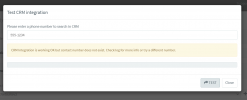
I get the default CRM Integration is working OK but contact number does not exist. Check log for more info or try a different number.
I've tried enabling verbose logs also and continually taking a look into the 3cxSystemService.log file, this is all I get though.
2024/06/27 20:52:05.062|10504|0005|Verb|CRM: Not processed. Number=[RedactedNumber], connection=1565, state=Ringing
2024/06/27 20:52:05.062|10504|0005|Verb|CRM: Add to processing. Number=[RedactedNumber], connection=1565, state=Ringing
2024/06/27 20:52:05.062|10504|0005|Info|CRM: ProcessActiveConnections(). Attached entries to connection:
2024/06/27 20:52:05.062|10504|0005|Verb|CRM: LocalMatches=. Number=[RedactedNumber], connection=1565, state=Ringing
2024/06/27 20:52:05.062|10504|0005|Info|CRM: Synchronize(...) called
2024/06/27 20:52:05.063|10504|0036|Info|CRM: maxConcurrency=2
2024/06/27 20:52:05.063|10504|0036|Info|CRM: making request to CRM. Number=[RedactedNumber]
2024/06/27 20:52:05.063|10504|0036|Verb|CRM: Removed from processing. Number=[RedactedNumber]
2024/06/27 20:52:05.063|10504|0036|Info|CRM: processing of [RedactedNumber]has been finished
It never triggers the middleware, yet when I run the middleware through postman the same way it works just fine and returns;
[
{
"id": "78370",
"phone": "[Redacted Phone Number]",
"company": "02171 Test Company Pty Ltd",
"email": "[email protected]",
"firstname": "Sam",
"lastname": "Tape",
"customer_url": "https://workinglinkhere"
}
]
I suspect my issue lies with my xml configuration or some setting with 3CX that isn't triggering the xml file.
I have attached it for your reference, and I am hoping someone can guide me in the right direction.
We are running Professional Annual, using version 18.
Many thanks in advance.
(Please note the system associated is not where this is running)
I have a unique situation. I am attempting to integrate Netsuite with 3cx using a few restlets, bit of middleware to generate signatures that netsuite accept and so on.
I have detailed up what I think is an adequate xml file but I know something isn't quite right because every forum post I look into, people have these long list of logs directly after their test tools. Mine has nothing. It contains nothing.
I get the default CRM Integration is working OK but contact number does not exist. Check log for more info or try a different number.
I've tried enabling verbose logs also and continually taking a look into the 3cxSystemService.log file, this is all I get though.
2024/06/27 20:52:05.062|10504|0005|Verb|CRM: Not processed. Number=[RedactedNumber], connection=1565, state=Ringing
2024/06/27 20:52:05.062|10504|0005|Verb|CRM: Add to processing. Number=[RedactedNumber], connection=1565, state=Ringing
2024/06/27 20:52:05.062|10504|0005|Info|CRM: ProcessActiveConnections(). Attached entries to connection:
2024/06/27 20:52:05.062|10504|0005|Verb|CRM: LocalMatches=. Number=[RedactedNumber], connection=1565, state=Ringing
2024/06/27 20:52:05.062|10504|0005|Info|CRM: Synchronize(...) called
2024/06/27 20:52:05.063|10504|0036|Info|CRM: maxConcurrency=2
2024/06/27 20:52:05.063|10504|0036|Info|CRM: making request to CRM. Number=[RedactedNumber]
2024/06/27 20:52:05.063|10504|0036|Verb|CRM: Removed from processing. Number=[RedactedNumber]
2024/06/27 20:52:05.063|10504|0036|Info|CRM: processing of [RedactedNumber]has been finished
It never triggers the middleware, yet when I run the middleware through postman the same way it works just fine and returns;
[
{
"id": "78370",
"phone": "[Redacted Phone Number]",
"company": "02171 Test Company Pty Ltd",
"email": "[email protected]",
"firstname": "Sam",
"lastname": "Tape",
"customer_url": "https://workinglinkhere"
}
]
I suspect my issue lies with my xml configuration or some setting with 3CX that isn't triggering the xml file.
I have attached it for your reference, and I am hoping someone can guide me in the right direction.
We are running Professional Annual, using version 18.
Many thanks in advance.
(Please note the system associated is not where this is running)