


- Joined
- Jul 10, 2024
- Messages
- 9
- Reaction score
- 2
Hello,
I am having trouble with authenticating my custom CRM using oauth2 for version 20 of 3CX. After clicking 'authorize' and then 'test', I can perform a contact lookup once, but when I attempt to test again, I receive an unauthorized error message. I checked the logs and the new refresh token is supposedly 'set', but when the second test is performed it still uses the old refresh token.
What is strange is that I use this exact template for version 18 and it works fine with no issue.
This is what happens the first time I test after authentication in v20:
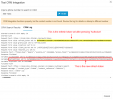
Note the refresh_token. It says it is set to the new refresh token at the end of the Auth scenario.
However, after my second attempt at doing a test lookup, the initial refresh_token is used:
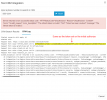
Any help or advice would be appreciated
I am having trouble with authenticating my custom CRM using oauth2 for version 20 of 3CX. After clicking 'authorize' and then 'test', I can perform a contact lookup once, but when I attempt to test again, I receive an unauthorized error message. I checked the logs and the new refresh token is supposedly 'set', but when the second test is performed it still uses the old refresh token.
What is strange is that I use this exact template for version 18 and it works fine with no issue.
This is what happens the first time I test after authentication in v20:
Note the refresh_token. It says it is set to the new refresh token at the end of the Auth scenario.
However, after my second attempt at doing a test lookup, the initial refresh_token is used:
Any help or advice would be appreciated


