Customise web client display fields

Status
Not open for further replies.

CranberryMM

Silver Partner
Advanced Certified
Joined
Jun 17, 2022
Messages
9
Reaction score
0
Hi all,

Is there any way to customise what fields are displayed when receiving a call in web client?

If not would it be possible to make this a suggestion in roadmap?

Many thanks
 
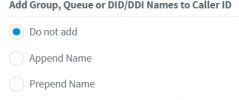
Hi, do you mean the tags as display name, for example, queue name, ivr, etc?

If so, then you can disable them from the pbx management console --- advanced --- contactats --- options, for example:

1700749852088.png


Or, you can have then enabled and choose which inbound rule will use a name or not. If the incoming call goes to an inbound rule that have no name, then these tags are not added as display name.
 
Hi, do you mean the tags as display name, for example, queue name, ivr, etc?

If so, then you can disable them from the pbx management console --- advanced --- contactats --- options, for example:

View attachment 38335


Or, you can have then enabled and choose which inbound rule will use a name or not. If the incoming call goes to an inbound rule that have no name, then these tags are not added as display name.
Thanks for that Alejandro, it was more the contact details saved within 3CX. The customer originally asked if the contact fields were customisable. Failing that if they could choose how the contact details are presented on an inbound call pop up.
 
There are only options to display the first name or last name first. The other fields are not changeable.
 
Status
Not open for further replies.

Forum statistics

Threads
112,328
Messages
591,905
Members
165,483
Latest member
AshleyStokes