Customized FQDN

nisutech

Bronze Partner
Advanced Certified
Joined
Apr 30, 2020
Messages
20
Reaction score
0
We are currently using 3CX 20.0 Update 6 (Build 724) with 3CX provided FQDN.

Thinking of changing the FQDN to match our company domain name. What is the best approach to do this? Can anyone direct me to the best resources to do this?

Thank you
 
First of all, you should urgently update the PBX! Unbind the old FQDN from the license, obtain certificates, etc., and then reinstall the system and restore it using the modified backup.
 
Hello @nisutech,

Please note that this will require to deploy a new instance so you can change the FQDN to a custom one.
In addtion, You must purchase, upload, and manually renew your own SSL certificate for the custom domain going forward.
Please see our blog post How to Use Your Own SSL & FQDN Certificate

Also,
You will have to reset to factory and reprovision any IP phone device you might have, as the provisioning URL will change
SBCs will lose connection so you will have to reinstall them
If you are using Mobile Apps then you will have to reprovision them via the QR code.
Also you will have to login again in your Web Clients using the new FQDN.
If you are using any integrations like CRM or M365 then you will also have to reconfigure them.


To proceed, you will first need to create a backup of your system without including the FQDN and License Key information. This will allow you to restore it to the new deployment once it has been created. For more information, please refer to our '3CX Backup & Restore Commands' document: https://www.3cx.com/docs/backup-restore-command-line/

Once the backup has been created, you will need to release the current FQDN from the license before creating the new installation. To do so:

1. Log in to the 3CX Customer Portal using the assigned email (Registration email for this key ) and navigate to 'My Systems'. Select the desired instance and click on 'Manage'.

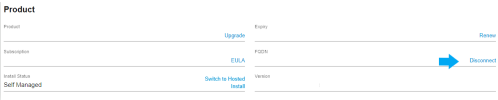
2. Under your product's information, find the Install Status and FQDN. As this is a self-hosted deployment, first turn off the host machine for this PBX. Once the PBX is stopped, refresh the license key information page, and you will find the 'Disconnect' option at the end of the FQDN entry.

1786425727542.png

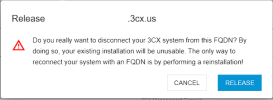
3. Click on 'Disconnect', and you will receive the 'FQDN release warning'. Click on 'Release' to disconnect your system from the current FQDN.

1786425732578.png

Once this is completed, you can deploy a new system without restoring the backup, using the same license key and select a Custom FQDN during the deployment process.

After the new deployment has been completed, configure the backup storage location under Admin > System > Storage so the system can access the previously created backup. Then navigate to Admin > Backup, select the backup, and click Restore to recover your previous configuration. This is required since you cannot restore a backup without FQDN and License Key information.
 
  • Like
Reactions: nisutech and bitn2
First of all, you should urgently update the PBX! Unbind the old FQDN from the license, obtain certificates, etc., and then reinstall the system and restore it using the modified backup.
@bitn2 thank you for your response
 
Hello @nisutech,

Please note that this will require to deploy a new instance so you can change the FQDN to a custom one.
In addtion, You must purchase, upload, and manually renew your own SSL certificate for the custom domain going forward.
Please see our blog post How to Use Your Own SSL & FQDN Certificate

Also,
You will have to reset to factory and reprovision any IP phone device you might have, as the provisioning URL will change
SBCs will lose connection so you will have to reinstall them
If you are using Mobile Apps then you will have to reprovision them via the QR code.
Also you will have to login again in your Web Clients using the new FQDN.
If you are using any integrations like CRM or M365 then you will also have to reconfigure them.


To proceed, you will first need to create a backup of your system without including the FQDN and License Key information. This will allow you to restore it to the new deployment once it has been created. For more information, please refer to our '3CX Backup & Restore Commands' document: https://www.3cx.com/docs/backup-restore-command-line/

Once the backup has been created, you will need to release the current FQDN from the license before creating the new installation. To do so:

1. Log in to the 3CX Customer Portal using the assigned email (Registration email for this key ) and navigate to 'My Systems'. Select the desired instance and click on 'Manage'.

2. Under your product's information, find the Install Status and FQDN. As this is a self-hosted deployment, first turn off the host machine for this PBX. Once the PBX is stopped, refresh the license key information page, and you will find the 'Disconnect' option at the end of the FQDN entry.

View attachment 52212

3. Click on 'Disconnect', and you will receive the 'FQDN release warning'. Click on 'Release' to disconnect your system from the current FQDN.

View attachment 52213

Once this is completed, you can deploy a new system without restoring the backup, using the same license key and select a Custom FQDN during the deployment process.

After the new deployment has been completed, configure the backup storage location under Admin > System > Storage so the system can access the previously created backup. Then navigate to Admin > Backup, select the backup, and click Restore to recover your previous configuration. This is required since you cannot restore a backup without FQDN and License Key information.
thank you @DimitrisL_3CX for your detailed explanation.

Can we use a self-signed SSL certificate?
 
No, you need a certificate from an official certification authority.
@bitn2 our system is not accessible from the internet. If we use official CA, it will not be able to verify the domain name.
 
That doesnt make any sence, your pbx needs internet access and should be accessable from internet.
 
You need internet for license activation or you'll risk losing functionality.
 
@bitn2 no, it doesn't. When I said it is not accessible from the internet, meaning we can't use the system outside of office network.

we do not open the ports on the firewall level and the 3CX is getting DHCP IP instead of dedicated static IP. Hence it will only work internally.

However, the system can access the internet to get updates and etc.
 
You need internet for license activation or you'll risk losing functionality.
@Alphabetic yes, I should say the system is not accessible outside of the office network.

It does have access to the internet to get updates and license activation
 
@bitn2 no, it doesn't. When I said it is not accessible from the internet, meaning we can't use the system outside of office network.

we do not open the ports on the firewall level and the 3CX is getting DHCP IP instead of dedicated static IP. Hence it will only work internally.

However, the system can access the internet to get updates and etc.
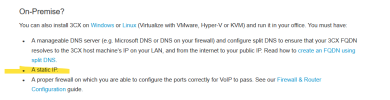
You should give your 3CX a static IP address or you'll end up with problems when your clients cant see the PBX because its changed.

1786435091220.png
 
@Alphabetic internally is fine, it is assigned a permanent IP, only for the internet line, the ISP assigned dynamic IP
 
@Alphabetic internally is fine, it is assigned a permanent IP, only for the internet line, the ISP assigned dynamic IP
ah ok, I misinterpreted.

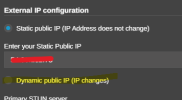
Honestly, id just stick with the 3CX FQDN until they do (if they do) any ACME support custom domains. Also, it is possible to use 3CX with a dynamic WAN. You just set it to Dynamic in the network settings.

1786435525169.png

obv if you are on CGNAT then you have no chance.
 
  • Like
Reactions: nisutech
Yes @Alphabetic it is the current setup.

my question was about the Custom FQDN, will it work if we use self-signed SSL certificate? because we can't access our system from the internet/outside of our office network?
 
Yes @Alphabetic it is the current setup.

my question was about the Custom FQDN, will it work if we use self-signed SSL certificate? because we can't access our system from the internet/outside of our office network?
No
 
Yes @Alphabetic it is the current setup.

my question was about the Custom FQDN, will it work if we use self-signed SSL certificate? because we can't access our system from the internet/outside of our office network?
@nisutech summarizing, for a custom domain you have to:
  • Use trusted CA supported by the different endpoints such as browser, OS, deskphones, self-signed are not supported.
  • Use static Public IP in your custom domain, dynamic public IP is not supported for custom domains, that is possible when using the 3CX domains.
  • Custom FQDNs are allowed for Pro and AI subscriptions.
If you plan to use the 3CX Apps in the same pbx LAN, remember to set the split DNS as mentioned in this document.
 
  • Like
Reactions: bitn2