Customized status texts for extension are ignored in selection menu

Status
Not open for further replies.

Christian_B

Forum User
Joined
Feb 24, 2021
Messages
32
Reaction score
12
As you can see from the screen shots, the customized status texts and labels are shown when you click the user icon on the upper left:
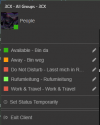
Screenshot 2022-01-12 145224.png

However, they are ignored when you use the "Set Status" function from the team list:
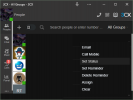
Screenshot 2022-01-12 145927.png

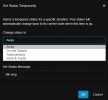
The selection menu shows the default names instead:
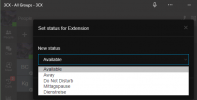
Screenshot 2022-01-12 145315.png
 
Works fine for me.

Using set status just doesnt show the custom labels, once you apply the status the label appears.
 
  • Like
Reactions: Evolute IT
"Using set status just doesnt show the custom labels"

That's my point. Not a serious issue by any means but I believe this to be a bug.
 
It's not a bug if it was never intended to show labels.
 
  • Like
Reactions: Evolute IT
For it's worth, when a collegue has configured a status text like "call direction to person X" it would be quite useful and more of an issue than in my example.
 
Dear kieferschild, aren't we getting are little ahead of ourselves? So you're the developer of this fine software?
 
This seems to be more inconsequential than expected. The function to set a temporary status actually does show the custom labels:
Screenshot 2022-01-12 153050.png
 
To clarify, this is indeed by design. To explain, there are two different settings for the Custom 1 and Custom 2 profile names. One is Global for the PBX and can be found under in the Management Console under "Settings >> Options" and the other is per extension and can be set from within the 3CX Client.

Now, when an extension is settings his OWN profile status, what he will see is the custom names set on his own extension (if set at all), if not, he should see the global names. When an extension is setting the profile status for another extension (has receptionist rights) then what the receptionist extension will see are the global names.
 
To clarify, this is indeed by design. [...]

Ok, this might explain, why this happens. I still find this quite odd because as mentioned above the "Set status temporarily" feature does show my personally customized labels. Furthermore, after setting my state my collegues also do see my personally customized labels. So showing the defaults - to myself and my collegues - before I actually set the status, doesn't looks "as designed" to my expectations. Neither, does it match my collegues' expectations.
 
Ok, this might explain, why this happens. I still find this quite odd because as mentioned above the "Set status temporarily" feature does show my personally customized labels
That's because you are still setting your own extension status.

Furthermore, after setting my state my collegues also do see my personally customized labels.
By showing the global status names while setting the status for another extension and then actually showing the extensions personal status name, receptionist extensions can know what actual status they put you in while still being able to see the personal status name given by the said user.
 
  • Like
Reactions: Evolute IT
By showing the global status names while setting the status for another extension and then actually showing the extensions personal status name, receptionist extensions can know what actual status they put you in while still being able to see the personal status name given by the said user.
The "actual status" is not lunch break or business trip, once you've customized these status for any other purposes. And that's the whole point of customization. If a user customizes these status, it doesn't make sense that anyone else sees any different information. The "actual status" is what a user configures and this should be shown to the team members, receptionist and obviously yourself.
 
The "actual status" is what a user configures and this should be shown to the team members, receptionist and obviously yourself
When I say actual status I'm referring to functionality. The two customizable statuses "Custom 1 - Default: Lunch" and "Custom 2 - default: Business Trip" have one major difference when it comes to functionality and that is that Custom 1 is a copy of the Available Status and will therefore ring before triggering any forwarding rules whereas Custom 2 will have the forwarding rules trigger immediately as it is a copy of DND. That said, it's good for the receptionist extension to know which of the two he/she is selecting when setting another extension to one of them.

In any case, the global names are only visible when another extension is setting the status for you. As you have seen yourself, the customized status name will come up after it has been set (via presence in "People" section) and the user himself always sees his own customized status while setting it and after.
 
  • Like
Reactions: Evolute IT
As can be seen from my third screenshot above, when I set my own status from the list of team members like I would for another team member, it does not show my customized labels even to myself.
 
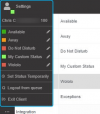
Okay my mistake, I misunderstood how you were changing your own status. That may be but that is because the specific method of setting the profile status is the one used for when setting another extension's profile status and hence uses the global profile status names. For changing your own status I'd recommend your own extension options in the upper-left corner:
1642160154368.png
 
Thanks for the clarification. That's what I told the user who stumbled across this oddity as well. Since the GUI has been rearranged a couple of times even if in minor ways, some users have trouble finding stuff. Also it's quite natural to expect that you can change your own status in the same place and way like you do for your team members. Personally, I'm not a fan of having multiple ways in a UI to perform the same operation - unnecessarily - exceptions apply.
 
  • Like
Reactions: ChrisC_3CX
Status
Not open for further replies.

Forum statistics

Threads
112,349
Messages
592,027
Members
165,514
Latest member
megalmazan