Data Connectors

CharmQuark

Premier Customer
Joined
Jan 12, 2025
Messages
27
Reaction score
4
Good day to all: staff, dealers, admins etc.,

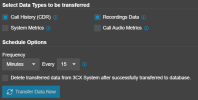
My AI Enterprise is hosted. The Data Connectors is a great feature. The fastest transferring is every 15 min period.
1781551848639.png
Is it possible to make the time frame for transferring shorter.
1 min?
I believe I cannot ask to transfer every new record immediately but that would by the ideal for the purpose of Call Center monitoring AUTOMATICALLY LOCALLY.
What is the possible shortest frame to trasfer?

Thank you
I would appreciate any comments and suggestions.

VK
 
@CharmQuark as I can see you have enabled CDR and also Recordings.
Is Recordings mantadory ?
Because if not, you may setup the CDR on the PBX side, select " Active Socket " and specify
the ip of your server.
After the termination of each call, the CDR will automatically be pushed to the CDR server.
Check here :

https://www.3cx.com/docs/call-detail-record-guide/
 
Thank you Nikos,
That is what I need. Diving in creaton of CDR Server on Linux!
 
While it is possible to use an IP socket connection, I think this is a less-than-ideal solution. If you lose your socket connection ever (network blip, software update, etc.) those transactions that took place during the outage are gone forever. In my experience people get pretty upset if your monitoring tool differs from 3CX even by one phone call.

Now, I freely admit that this is a self-serving suggestion, but you may want to take a look at our 3CX Exporter tool. We can detect the creation of a new CDR file instantly and push the data to your monitoring database (SQL Server, MySQL). And because we are processing files rather than socket information, we can "catch up" if you have a network or software blip. Also, we can replicate all 3CX tables (way more information than what is available through 3CX) on a schedule (default is every 60 seconds), but you can do it as frequently as you want. The entire process is automated so you do not need to do anything to keep the data up to date.
 
While it is possible to use an IP socket connection, I think this is a less-than-ideal solution. If you lose your socket connection ever (network blip, software update, etc.) those transactions that took place during the outage are gone forever. In my experience people get pretty upset if your monitoring tool differs from 3CX even by one phone call.

Now, I freely admit that this is a self-serving suggestion, but you may want to take a look at our 3CX Exporter tool. We can detect the creation of a new CDR file instantly and push the data to your monitoring database (SQL Server, MySQL). And because we are processing files rather than socket information, we can "catch up" if you have a network or software blip. Also, we can replicate all 3CX tables (way more information than what is available through 3CX) on a schedule (default is every 60 seconds), but you can do it as frequently as you want. The entire process is automated so you do not need to do anything to keep the data up to date.
Thank you for paying attention to my question. When you say your tools can detect the creation of a new CDR file instantly which 3cx implementation do you mean - hosted or self-hosted?
Regards
VK
 
The only environment where you cannot use our tools is when your 3CX server is hosted by 3CX on 3CX servers. Everywhere else, hosted or on-prem, Windows or Linux, works perfectly.

Process Summary (simplified):
  1. Install our VoIPTools Relay on your 3CX server
  2. Configure 3CX to create a separate CDR file for each phone call
  3. Our Relay performs real-time monitoring for new CDR files
  4. When a new CDR file is created, we read the file, parse the contents, and send an event
  5. Our Exporter tool subscribes to real-time events pushed from the Relay
  6. Exporter receives the event data and saves it into your database in a CDR table in real-time
  7. The CDR file is renamed with an extension of ".processed"
  8. Our CDR retention policy on the 3CX server automatically deletes old CDR files with the .processed extension older than X days.
  • The database can be either Microsoft SQL Server, MySQL, MariaDB or PostgreSQL. For Microsoft, we can use the free SQL Express edition or above

  • The advantage of our approach over the IP socket approach is that you can turn off either the Relay or Exporter for as long as you want (for updates for example), and it doesn't matter. When the Exporter service starts, it asks for a list of existing CDR files that have not already been processed and catches up where it left off, then processes any new events in real-time.

  • With the IP socket approach, if your socket goes down for any reason, any phone calls that take place while the socket is down are lost forever. There is no recovery, no catching up later, period. The data is gone.
 

Latest Posts

Forum statistics

Threads
112,276
Messages
591,632
Members
165,393
Latest member
Carlos - EC Mates