Database Access Tool for SQL integration

Status
Not open for further replies.

cantvchicago

Premier Customer
Joined
Nov 7, 2018
Messages
14
Reaction score
1
Hi All,

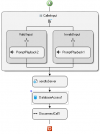
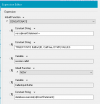
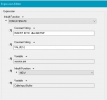
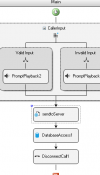
Attempting to output CallerInput.Buffer to a new record in a table in my SQL back end...

with NO luck.

My flow ends with a WebService REST POST of the data to another server for further processing which works great. My problem starts with the Database Access Tool... It just does nothing.
1709072808495.png


1709072599000.png

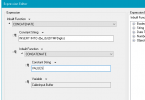
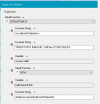
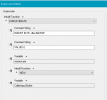
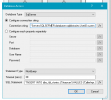
Are there any glaring issues with the config in the screen grabs? Need more? does this sound like a SQL problem? Permissions or something? I have reached the limits of my patience and apparently skill level because I've been trying to get this to happen since this morning. Any help would be appreciated.
 
First, the SQL statement looks wrong, as it seems to be a static string with the text "CallerInput.Buffer", however you need the value of that variable. To get that, you will need to use the CONCATENATE function, and concatenate static text with variables. Use the Expression Editor to build this expression without errors.

If the issue persists, you should check the 3CXCallFlow.log file in verbose mode after making a test call.
 
  • Like
Reactions: cantvchicago
Thanks Ed,

Looks like I should be asking this question over in the SQL Forums. LOL! I'll give it a try.


Thanks again.

Jason
 
Update: NO JOY. still unable to pass data into a new record in a current table.
1709745580743.png
Connection String: "Server=HOST\NamedSqlInstance;database=sqldb;UserID=sqluser;Password=sqluserpass;"

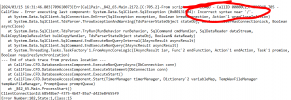
Using this connection string throws and "Unexpected Escape" error at "OST\Nam". But that's the standardest format of a named instance. Do I need quotes? or half quotes? ??

and why is the expression editor changing the contents of my manually entered data in both the "Connection String" and the "SQL Statement" field of the database access tool? It drops off characters and omits parts of lines... ??? Is this the method of building the expression with the Expression editor?

1709747543068.png
 
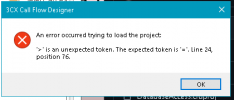
THIS IS the ACTUAL error thrown by 3cx when I load this CallFlow.
1709766750283.png
 
Using this connection string throws and "Unexpected Escape" error at "OST\Nam". But that's the standardest format of a named instance. Do I need quotes? or half quotes? ??
The Expression Editor will automatically escape that for you. The correct expression would be:
"Server=HOST\\NamedSqlInstance;database=sqldb;UserID=sqluser;Password=sqluserpass;"

and why is the expression editor changing the contents of my manually entered data in both the "Connection String" and the "SQL Statement" field of the database access tool? It drops off characters and omits parts of lines... ??? Is this the method of building the expression with the Expression editor?
Maybe you are using new lines. Try changing the "Constant String" to "Multiline constant string".
 
So I am able to run this query from my SQL Client:

INSERT INTO dbo.tbldtmf ("ID", "CallTime", "DTMF")
Values (12,372024,109)

SQL creates a new record in the table.

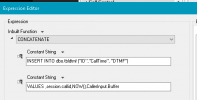
But this 3CX CFD Database Access SQL Statement:

CONCATENATE("INSERT INTO dbo.tbldtmf (\"ID\",\"CallTime\", \"DTMF\")
","VALUES",session.callid,NOW(),CallerInput.Buffer)

does nothing.

Should I be concatenating every Variable/Value pair?
1709938411670.png
 
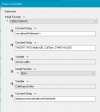
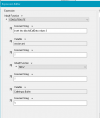
This is what the Compiler sees. I used the expression editor for this and there appears to be an error STILL in the connection String after the Hostname.1710188131556.png

Is THIS what I'm after?

1710188228303.png
 
So I am able to run this query from my SQL Client:

INSERT INTO dbo.tbldtmf ("ID", "CallTime", "DTMF")
Values (12,372024,109)

SQL creates a new record in the table.

But this 3CX CFD Database Access SQL Statement:

CONCATENATE("INSERT INTO dbo.tbldtmf (\"ID\",\"CallTime\", \"DTMF\")
","VALUES",session.callid,NOW(),CallerInput.Buffer)

does nothing.

Should I be concatenating every Variable/Value pair?
View attachment 40210
Here you're putting the variable session.callid as constant string, you should concatenate it as a variable. Also, looks like you are missing a parenthesis after "VALUES". And the NOW() function will return a string, and you're not adding quotation marks around it. You should check the 3CXCallFlow.log file and see the SQL statement being executed, most probably it has syntax errors.....
 
Here you're putting the variable session.callid as constant string, you should concatenate it as a variable. Also, looks like you are missing a parenthesis after "VALUES". And the NOW() function will return a string, and you're not adding quotation marks around it. You should check the 3CXCallFlow.log file and see the SQL statement being executed, most probably it has syntax errors.....
Hi Ed, Thanks for responding.

Yes, In that example, directly copied from the SQL Statement field in the Database Access configuration screen, session.callid is sans quotation marks around it...

...but that was output from the Expression Editor. It wasn't a manual entry.

I was under the impression I should build all my statements with it. ?? Do I have to edit the Editor?
 
You need to use the Expression Editor to concatenate static text with variables, and this way build the SQL statement you want to execute.
 
You need to use the Expression Editor to concatenate static text with variables, and this way build the SQL statement you want to execute.
I am. It isn't working. Is there a trick to getting the expression editor to output the SQL statement I want to execute or is it just a matter of getting the expression built correctly? is the expression in the screenshot built correctly?
1710354171750.png
 
Hello @cantvchicago,

Looks like you're shooting in the dark. You're not going anywhere that way. You have 2 possible ways to achieve your goals:
1) Learn how to use the CFD before working on a real project. Play with the examples. Check the video tutorials. Spend some time on it so you understand what you're doing.
2) If you feel that this is not for you, hire someone. There are many 3CX partners offering their services to create apps like this.
 
  • Sad
Reactions: cantvchicago
Well, it might LOOK that way, but I assure you the room is well lit and I am taking careful aim. I'm trying different approaches to build a functional SQL Statement in the Syntax that CFD can complile correctly. I've never had to fight against it like this.

I checked out the links you offered. The videos were not available and the one cfd project file that might've been relevant, did this: 1710440736397.png

I HAVE gotten somewhere though, to the point of knowing that the issue IS within the way the Expression Editor constructs SQL statements. Seems to work for the other expressions I've written with it but not this one. So, there's some information that I don't have about the Expression editor that I'm clearly not going to get here.

Thanks!
 
Last edited:
Hello @cantvchicago,

Sorry if I made you feel bad, but please check this screenshot that you sent:
1710448756691.png

This expression will CONCATENATE the static text "var sqlinsertStatement = ", which to start is wrong. That looks like some code that you will use in javascript. But that's not SQL. This is why I have the feeling that you don't know what you're doing.
Please note that we can't do this for you, we can just give you pointers so you can do this by yourself.

So, if you still want to try, what you need to do is concatenating static text with variables, in order to obtain an SQL statement. The result of this concatenation should be something like:
INSERT INTO tbldtmf..............
 
  • Like
Reactions: Evolute IT
That's not shooting in the dark, Ernesto, it's trying something new. It also isn't wrong. It's also very much SQL. Assigning a value to a SQL variable (sqlInsertStatement) and then using it in subsequent queries wherever an expression is allowed, such as in a WHERE clause or in an INSERT statement is not a new technique. Just trying it out in this Editor.

ALL I've been doing is spending time searching "3CX Call Flow Expression Editor Syntax" going through example after example of weakly relevant content, watching online videos, of which none cover this, and wading through the quagmire of documentation on 3cx, finding a dearth on the Expression Editor and how and why it does what it does. Then to get an example from the Support Team that appears to hold some valuable clues but doesn't work; all in a effort
to decipher how this:

INSERT INTO tblDTMF
VALUES (session.ani, NOW(),CallerInput.Buffer)

When written manually like this:
CONCATENATE ("INSERT INTO tblDTMF"," VALUES ("session.ani, NOW(), CallerInput.Buffer)

And then built in the "intuitive" CFD Expression Editor like this:


1710538695027.png
Results in this:

--CONCATENATE("INSERT INTO dbo.tblDTMF ","VALUES (",session.ani,NOW(),CallerInput.Buffer)

But in the 3CXCallFlow.log, it leaves THIS hot steaming pile:

1710543449285.png
And NO new record inserted into tblDTMF.


Where does that forward slash come from? I didn't include it in my statement, didn't type it anywhere in the Connection String. It's the expression editor doing something. What is it doing? Why? How do I make it STOP?

The ONLY thing I wish you would do FOR me, is explain this, because while I have a good solid understanding of what I'm doing, I certainly DON'T know what IT is doing.

Thanks.

Jason
 

Attachments

  • 1710538471537.png
    1710538471537.png
    13.1 KB · Views: 4
  • 1710540805782.png
    1710540805782.png
    3.6 KB · Views: 4
CONCATENATE("INSERT INTO tblDTMF VALUES ('", session.ani, "', NOW(), '", CallerInput.Buffer, "')")
 
The NOW() function returns a date & time, which contains that slash. If you look at the 3CXCallFlow.log file, just a few lines before the error, you will see the actual SQL statement being executed, and that will help you understand what you need to add. You're missing quotation marks, which are needed by SQL.
 
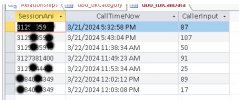
FIgured it out.

This works.
1711129283229.png

Perfectly.
3cxEXPEDSOLUTION.jpg

Which does in fact, output THIS:

[ CONCATENATE("insert into dbo.tblCallData values ('",session.ani,"','",NOW(),"','",CallerInput.Buffer,"')") ]

Entering that Manually seems like it would have added something.
But what ever.

Just noticed your response @conceptweb, did you write that with the Expression Editor or did you write it manually?
 
Last edited:
  • Like
Reactions: Evolute IT
Just noticed your response @conceptweb, did you write that with the Expression Editor or did you write it manually?
Manually. Kinda used to it.
 
Status
Not open for further replies.