Solved Dect phone not ringing

Status
Not open for further replies.

ZenMasta

Customer
Joined
Mar 10, 2010
Messages
254
Reaction score
10
I just picked up a W60B with a W53H. Setup was a breeze, but after having adding the extension to all of the ring groups/queues etc, this handset is not ringing. The only calls that reach the handset are if you directly dialed the extension.

The extension itself doesn't have an IP phone provisioned, just 3cx app I wonder if this is part of the problem.
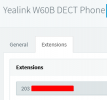
On the dect side, you can see that I've selected 203 as the extension.

I'm on v16.0.16
 

Attachments

  • dect-3cx.png
    dect-3cx.png
    5.3 KB · Views: 16
The extension itself doesn't have an IP phone provisioned, just 3cx app
You'd have to provision an IP phone (the Yealink) as an extension, or I don't know how you would expect it to work. It would have to show as registered, in 3CX, to be able to receive calls.

Perhaps you can provide additional information, about what you have done so far.
 
If you are using a DECT phone, then in the extension's setting it is normal not to see a phone provisioned, that should be ok.

You have selected the extension under the FXS/DECT settings page which is also correct.

You are however running V16 which is outdated, so not sure if this is being caused by a problem that was solved in V18, I would urge you to upgrade your system as soon as possible.

The W60B needs to have the latest firmware too, so please follow this guide here to get your firmware updated to the latest versions
https://www.3cx.com/sip-phones/yealink-dect-w52p/

W60B 77.85.0.25
W53H 88.85.0.35

When this is done, I would recommend to factory reset the base (again covered in the guide) and then reprovision it from scratch. This way at least we will be more confident the provisioning took place correctly.
 
I've updated the firmware on the dect and handset (also factory reset). No success. Updated to v18, no success.
 
Ok then it appears that something else is amiss.

Login to the same extension from your webclient. Does the webclient behave the same as the DECT phone?
 
The extension is not logged into the queues and even *62 doesn't work. even though the voice prompt says that it logged in.
 
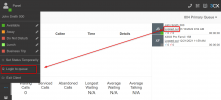
There are two queue logins:

1. Global login (should the extension be in or out in general)

2. Explicit login (for a given specific queue, should it be in or out)
https://www.3cx.com/docs/pbx-queue-status/#h.ivks9coc1qu5

You need both to be true before you get queue calls, so unless this is done, you will not receive calls.
To achieve this, login via the webclient as the extension, and click both of these:
1641801375942.png

Alternatively, if you are a Queue Manager, you can log that person in from your own webclient.
 
Apparently, I only added the extension to the ring groups and NOT the queues. :rolleyes:
 
Last edited:
  • Like
Reactions: JohnS_3CX
Ok glad you found what it was! Is everything running ok now? :)
 
Yeah everything works as expected.
 
  • Like
Reactions: JohnS_3CX
Status
Not open for further replies.

Members Online Now

Forum statistics

Threads
111,831
Messages
589,277
Members
164,660
Latest member
RJenkinsROCK