


- Joined
- Oct 21, 2025
- Messages
- 10
- Reaction score
- 3
I've run into an issue with creating an additional On Premise instance after upgrading another one from the free licence.
When I try to get the config file from www.3cx.com/install it shows the below:
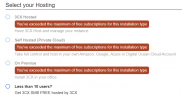
The newly upgraded instance shows correctly in the portal system list

But I've still got the old free licence showing up

There are two buttons inside the licence, Delete & Unlink, but I'm not sure which of them will properly remove it from the account and allow me to create a new instance.
My understanding is the normal procedure is to create with a free licence, test client's services, upgrade to commercial licence.
Any help would be appreciated.
When I try to get the config file from www.3cx.com/install it shows the below:
The newly upgraded instance shows correctly in the portal system list
But I've still got the old free licence showing up
There are two buttons inside the licence, Delete & Unlink, but I'm not sure which of them will properly remove it from the account and allow me to create a new instance.
My understanding is the normal procedure is to create with a free licence, test client's services, upgrade to commercial licence.
Any help would be appreciated.


