Department Phonebooks - Further Info

OAH

Customer
Joined
Oct 10, 2023
Messages
25
Reaction score
2
I have just installed v20 Update 8 RC2 and I am testing how department phonebooks work.

Is there any info / guides I have missed to give me an idea of how this is expected to work yet ?

I have created a user and a department to test with but I cant quite figure out the logic.

On the desk phone (Yealink - using hot desking) the phone can see the company phonebook but not the department phonebook. Is this expected behaviour or is it hotdesking causing the issues ?

On the 3CX mobile app I can see the company phonebook but not the department phonebook. Is this expected behaviour ?

On the user web login I can only see the Department phonebook, this is what I had hoped for and seems correct ?

When a user is in a department with its own phonebook should the phonebook or contacts be available to the App and/or DeskPhone ?

Should a department user still be able to see the whole company phonebook ?

Sorry if this is a bit of a ramble but I cant quite pin down if this is the current situation or I have missed something.

Thanks in advance
 
@OAH lets start with the basics.
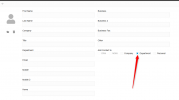
Have you added a contact an entry from the web clinet and select the option for this contact to be set on the Department ?
Not Personal or Company.


1769424222829.png
 
So I have not done it this way. When you click this button how do you then define the department its going to ?
Do you type it into the Department field ?

I ask as as there is a menu, Admin > System > Phonebook where you can then select the department in the top right and see the contacts within that department. This is how I created the contact I am testing, but when I setup as instructed above, even typing the department in it is not shown in this menu.
 
@OAH
You do not select the Department, you just click it.
The contact will be saved on the " Main Department Membership " this agent is assigned to.
Then the rest of the Members of the Department will be able to see this contact.
You will not see it on the Admin Console >> System >> Phonebook.
There you see the Company Phonebook where it has a field to type which is called Department.
This does not reflect the Department of the PBX, but the Contact 's.
Example :

Bob is an external contact and you add it as a company contact in the PBX.
Bob is on Sales so on the Department section of the contact you type "Sales" and on the Company the name
of the company where Bob works to.
And so on.

I hole this clears up things for you.
 
I think it clears up parts of the question but might raise others.

So I think what your explaining is. If I make a user called BOB and put him in the department SALES. when Bob logs in and adds a contact to the phonebook using the Department selection box the contact will be made for/in the SALES department Phonebook.

If this is the case what is this menu for Admin > System > Phonebook, then select the department in the top right ?

Can you move a contact between departments ?

Also still the questions on APP vs DeskPhone vs Web app behaviour ?
 
@OAH
If this is the case what is this menu for Admin > System > Phonebook, then select the department in the top right ?
>> This option exists in order to sort the contacts that have been added per department.
In this case this is easy for the admin to see how many contacts have been added to specific departments.


Can you move a contact between departments ?
>> No you can not, but you can add them manually or import them.


Also still the questions on APP vs DeskPhone vs Web app behaviour ?
>> The contacts will appear on the registered to the extension endpoints.
Like Deskpone ( after re-provision or after the scheduled re-provision time ), the APP and the Web.
 
I think I understand what your saying but I am unsure this is what I am experiencing.

Should I also expect to see the company phonebook contacts as well as the department's ?

When testing on the following I am getting :

Mobile APP
I can see both Company & Department Phonebook contacts

User Web Page
I can see only the Department Phonebook contacts

Desk phone
(Yealink T44U Hotdesked) I can see only the Company Phonebook contacts, even after reprovision, reboot or logging in and out.

Also thanks for your help and patience with this ;)
 
Regarding your questions, please see below:

User Web Page
I can see only the Department Phonebook contacts

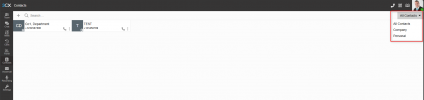
You should see contacts added to personal and company as a member of the department, filtering to see All Contacts on the right of the webclient:

1769439134457.png

Desk phone
(Yealink T44U Hotdesked) I can only see the Company Phonebook contacts, even after reprovisioning, rebooting, or logging in and out.

On a normal deskphone, without hotdesking, only the company phonebooks sync, and only the number entered under the mobile field of the company contact entry.
 
Last edited:
@OAH check the release notes from RC3.
Update the PBX and then try again with the hotdesking phone :

https://www.3cx.com/blog/releases/v20-u8-rc3/

  • Hot Desking Phonebook: Resolved an issue where Hot Desking failed to retrieve the department phonebook due to an unhandled exception.
 
Fantastic Stuff.

We have a client who is desperate for the department phone book feature.

Can i just ask is there a option or plan to be able to limit access to the company phonebook ?

They are looking to be able to move their field staff onto the App but not have them be able to access the wider company phonebook. If this isn't possible does the app / phone pull from multiple department phonebooks if the user is a member of multiple departments ?

Thanks in advance
 
Last edited:
It will pull only the main department's phonebook, the one that is set under their user settings and is set as their Main Department Membership.
 
So I have setup a user to test on (20 Update 8 RC3) with but when I log into the 3CX mobile app (IOS) I can see contacts from the whole company phonebook and the department phonebook.

The DeskPhone is now doing the same since RC3.
 
Yes, you will see in the main company phonebook if any contacts are entered here as well. This is to be expected, but only the department contacts will be visible from the main department membership, along with any main company phonebook contacts and personal contacts, if any. This, I'm afraid, cannot be changed.
 
Yes, you will see in the main company phonebook if any contacts are entered here as well. This is to be expected, but only the department contacts will be visible from the main department membership, along with any main company phonebook contacts and personal contacts, if any. This, I'm afraid, cannot be changed.
Thanks for the Info.

I will go away and do a little testing to see if I can figure a way to make it work how our customer requires.

Thanks to everyone for their help
 
Ok so after some testing I don't seem to be able to figure out a way to make this work as I need.

When a user is in multiple departments only the phonebook of the Main Department Membership that is configured for that user is available.

Just to reiterate the configuration required.

We have a need for internal departments to be able to caller id several thousand customers who call in, but would like remote workers to be able to use the platform from the mobile APP without gaining access to the wider customer data.

The bit that's throwing this is we have one internal department that will need access to at least two separate phone books.

I can accomplish either but not both together.

Any ideas ?
 
Perhaps a CRM integration is a better path to take? Or perhaps the AI agent or similar, that can pick up the call within the relevant department and pass the contact info to the actual answering human agent.
 
  • Like
Reactions: Evolute IT
The client in question uses eworksmanager as their CRM.

It has an API but unfortunately I don't really know where to start with getting that integrated.
 
The client in question uses eworksmanager as their CRM.

It has an API but unfortunately I don't really know where to start with getting that integrated.
We can help with that.
 
On snomD8xx IP-Desk-Phones i can NOT see the Department Phonebook contacts. Can anyone confirm this?
 
  • Like
Reactions: Federico Serale

Forum statistics

Threads
112,149
Messages
590,964
Members
165,170
Latest member
SupportRock