Solved Desktop App 18.5.26 - Keep Dialer on Top doesn't work

Status
Not open for further replies.

steeve.leroux

Free User
Joined
Sep 7, 2021
Messages
9
Reaction score
5
Hello,

We have the version 18 of 3CX here since last week and we installed the Desktop App 18.5.26. I activated the option "Keep Dialer on Top" but it doesn't work.

I tried the mentioned test from this thread without success.

https://www.3cx.com/community/threads/windows-client-v18-keep-dialer-on-top-desnt-work.84322/

We tried several PC, uninstall the application and reinstall it...

Operating system : Windows 10 v20H2 Build 19042.1288)

Thanks for your attention.

BR

Steeve
 
  • Like
Reactions: portugaltrails
Thanks @steeve.leroux for creating the thread after our PM. I'll investigate further and come back to you as soon as possible.
 
Hi @steeve.leroux,

Can you confirm that it's the dialer that isn't staying on top, rather than the Desktop App in general?
 
Hello,

Yes it's just the Dialer. The Desktop App stay at the screen.

BR

Steeve
 
Hi @steeve.leroux

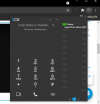
So to confirm, what you see here does not happen?

1635427399210.png

If I drag the window behind it around, the Dialer stays on top.
 
My problem is that the dialer does not appear automatically when somedbody calls me. I need to open it manually by clicking here.

1635427785417.png

Steeve
 
Hello again!

If the Web Client is focused, do you not see a popup in the Web Client when the call comes in? Do you accept notifications from your PBX FQDN in your browser?
 
I'm not connected to the Web Client but If I use it, I can see the call in a popup. The issue is only with the Desktop App.
For information, my Web client is closed.

Steeve
 
Hi @steeve.leroux,

When you call, it does ring correct? It doesn't go to voicemail instantly? As in, the person who is calling can hear the ringing, the call shows on the panel but the user using the Desktop App have the call pop up at all (but can hear it I assume)?
 
Yes I can hear the ring. The problem for us is that we need to have the visual popup because we don't have anytime the headset on the ears, most of us don't use a device phone.

Steeve
 
  • Like
Reactions: VasilisV_3CX
Update: Logged on to @steeve.leroux's side and saw the issue happen. Restarting the Desktop App seemed to solve this temporarily. I was unable to replicate thereafter. Awaiting Steeve to let me know if / when this happens again so I can check again.
 
  • Like
Reactions: Evolute IT
Hello @VasilisV_3CX it works fine for the moment. I'll try to restart my PC and check a call like this morning and I'll let you know.

Thanks for your time.

BR

Steeve
 
  • Like
Reactions: VasilisV_3CX
Hi @steeve.leroux,

Following up, is everything working as we left it on Friday?
 
Hi @steeve.leroux,

Following up, is everything working as we left it on Friday?
Hello Vasilis,

I was on holidays last week. We migrated completely our phone infrastructure to 3CX last saturday. No problems concerning phone systme, queues, etc... but users reported us that if he don't activate the dialer, it doesn't appears at the first call.

I leave the office now, can I take contact with you tomorrow ?

BR

Steeve
 
Sure thing @steeve.leroux, contact me tomorrow and we'll investigate!
 
Sure thing @steeve.leroux, contact me tomorrow and we'll investigate!
Hello Vasilis,

Sorry for the delay but we change all our IT infrastructure for the moment and I was busy the last days.
I follow too the 3CX webinar every afternoon. I asked to the trainer if he heared something about that and they said to me that some users experienced this issue when they used Remote Desktop session or remote applications.

After that, I did some test on my PC with calls from an "hot desking" device to my own number. No applications was opened, no RDP session and popup doesn't come. It's ok with the "old" webclient. I restarted my PC without effect.

For information, it's the case for all of my colleagues. They need to let the popup opened in a corner of the screen... it's a workaround and we can work like that for the moment.

Is it possible for you or an other tech to organise something next week.

Thanks in advance ;-)

BR

Steeve
 
Hi @steeve.leroux,

Glad to hear back from you! Sure let me log on next week whenever suits you and lets get to the bottom of it. Should be easier now that you're able to reproduce it. PM me when you'd like to organize this for.
 
  • Like
Reactions: steeve.leroux
Hello Vasilis,

I'm sorry for the delay but I have a good news concerning the issue. We can reproduce it and we had a workaround.

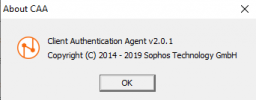
We use the following Client Authentication Agent to access to internet

1638954400017.png

We launch automatically the Desktop 3CX App at the starting of Windows 10 and it comes before the launching of the Client Authentication Agent. When we receive a call the dialer doesn't appear.

If we disable the automatic starting of the Desktop 3CX App and wait until the Client Authentication Agent has started before launching it, the dialer comes up at each calls.

There is clearly an interaction between the two applications.

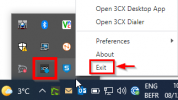
We also realized that when we asked to our users to quit 3CX and restart it, we asked them to click on the cross in the application window. But this one is still active in the Notifications area. It's necessary to close the application from there.


1638955677274.png

I hope this explanation is clear and maybe can help others ;-)

BR

Steeve
 
Thank you for the update!

That would indeed explain it. When a VPN client is being used or anything else running on the PC that affects networking, we always recommend launching and configuring that first before launching the 3CX App as failing to do so will most probably, as in your case, affect the 3CX App's connectivity until it is completely exited and re-launched.

Thank you again for sharing your solution, I'm sure this information will prove useful for others with similar setups.
 
  • Like
Reactions: steeve.leroux
Status
Not open for further replies.

Forum statistics

Threads
112,025
Messages
590,368
Members
164,978
Latest member
FringeIT-Eric