


- Joined
- Jan 31, 2022
- Messages
- 8
- Reaction score
- 1
I feel like the size of the interface and fonts on the 3CX Desktop App is far too big and inflexible. They should either allow you to scale using the Ctrl-Plus Ctrl-Minus keys or setup in the "Settings" on the app.
In the old 3CX Phone for Windows (v16) apps I like to keep my Queue View panel and dialler pad open on one of my four screens. Together they take up less than 1/3 of a screen and are clearly readable. They'll fit in a space of 590w x 1040h and have room to show 8 calls on the go and space left over for other stuff. That means on a 1080p screen I have a whole 1000 pixels left to put Slack or other handy apps to one side with no overlap. See image. Even this I still feel is a little overweight, design wise.
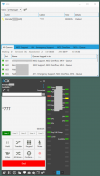
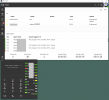
The current Windows app with that equivalent view takes up 1200x1040 pixels. That's MORE THAN TWICE AS WIDE, AND STILL doesn't have room to show the full details of any one call on one line, meaning you can only fit 3 calls in this view before you run out of space, as opposed to 8, and can only see 6 of your agents as opposed to 10. The only way to get even CLOSE to getting the same info on the screen as you had in the V16 client is to dedicate an ENTIRE SCREEN to your queue manager.
Can we please have zoom-in-out or set font size on the app? I don't want to get yet another screen just to keep track of calls.
In the old 3CX Phone for Windows (v16) apps I like to keep my Queue View panel and dialler pad open on one of my four screens. Together they take up less than 1/3 of a screen and are clearly readable. They'll fit in a space of 590w x 1040h and have room to show 8 calls on the go and space left over for other stuff. That means on a 1080p screen I have a whole 1000 pixels left to put Slack or other handy apps to one side with no overlap. See image. Even this I still feel is a little overweight, design wise.
The current Windows app with that equivalent view takes up 1200x1040 pixels. That's MORE THAN TWICE AS WIDE, AND STILL doesn't have room to show the full details of any one call on one line, meaning you can only fit 3 calls in this view before you run out of space, as opposed to 8, and can only see 6 of your agents as opposed to 10. The only way to get even CLOSE to getting the same info on the screen as you had in the V16 client is to dedicate an ENTIRE SCREEN to your queue manager.
Can we please have zoom-in-out or set font size on the app? I don't want to get yet another screen just to keep track of calls.
Last edited:
Upvote
5


