Dial and accept connections to/from ERP system

Status
Not open for further replies.

Joern

New User
Joined
Apr 19, 2023
Messages
2
Reaction score
0
Hello,
I would like to know what possibilities I have to connect an ERP system to the 3cx phone system.
It is a Windows client written in C#. And I would like to have two functionalities:
  • accept incoming calls: when ringing, the customer is identified and its data is shown in a dialog
  • make outgoing calls: clicking on a button in the customers info dialog
I thought that your Call Control API could be suitable for this. But unfortunately I saw that this API is not official any longer (since 4 years).
I read it here: https://www.3cx.com/community/threads/3cx-call-control-api.64664/

Is there any other possibility to reach my targets?

Regards,
Joern
 
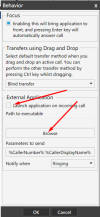
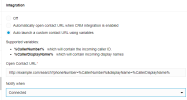
If you can open your Windows client with the variable eg %CallerNumber% then you should be good to go with the incomming calls, by using the integration in your SoftPhone / DesktopAPP

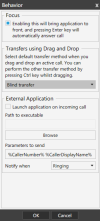
SoftPhone --> Settings --> Advanced Settings --> Behavior
1683579075273.png

DesktopAPP --> Settings --> Integration
1683578776494.png

For the outbound, add a tel: in front of the numbers stored in your ERP, and you should be able to make "Click2Call"

Hope this helps.
 

Attachments

  • 1683578983008.png
    1683578983008.png
    38.2 KB · Views: 4
  • Like
Reactions: Evolute IT
Hello,
thank you for your quick response.
I think the outbound calls could work the way you suggested (with tel: ).

But the incoming calls seem to be a problem.
The ERP system is always running, so starting it with the caller number is not an option for me (%CallerNumber% and so on).
When somebody is calling, I need this information in the client before the call is accepted. I would like to use the caller number to find customer information in a database and show them while ringing. And then click on a button (or something else) to accept the call. Currently the client is able to communicate with the TAPI interface this way.
 
Hmm. I only have one suggestion, don't know if you can use this to get further to your goal.

You can grab the incoming number by creating a Batch file eg. copy_to_clipboard.bat
Fill in:

@echo off

echo %1| clip

Let your 3CX Integration run this Batch file when ringing (think you will need to use the old SoftPhone for this)

Now you have the number in the Clipboard, so now you will have to figure out a way to use this for your lookup.

Dont know if this helps you a lot, but it is the only thing I can think of to get you further to a possible result.
 
  • Like
Reactions: thpan
Status
Not open for further replies.

Forum statistics

Threads
112,322
Messages
591,887
Members
165,470
Latest member
Robert Lee