Dial codes not working

Status
Not open for further replies.

joegravil

New User
Joined
Mar 11, 2022
Messages
10
Reaction score
1
We have been trying to get dial codes working by reading through the forum but none of the solutions I have found are working. I'm happy to share screenshots of our settings if needed.
 
What dial codes are you referring to, please be more extract
 
All of our dial codes won't work when we try using them. The main one we have been trying is *5 to block the caller ID
 
First off, can you go into Dashboard and check "System Extensions", just make sure that it is green as shown below:
1647010628387.png

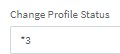
If yes, go to "Settings >> Dial Codes" and set the "Change Profile Status" Dial code to *3 as seen below:
1647010791354.png

Then, from any extension, dial *30, it should say "Available status set", what do you hear? If this is in fact what you hear then dial codes in general should be working fine.


That said, if the above applies, you might only be having a problem with the "Block Outbound Caller ID" dial code which might actually not be a problem with the dial code at all. It may merely be that the SIP Provider has some limitations, what exactly is happening when you try this? Does the call go through and have the Caller ID visible or does the call fail?

Also, could you let us know which SIP Provider you are using? Is it a 3CX Supported one?
 
Hi,

I checked the dashboard and the green tick was there.

When I dialled *30 it said "Available status set"

When I try dialling with *5 then the number, it says "number does not exist" then ends the call. We are using Twilio due to ease since we use it for other services within the business
 
I checked the dashboard and the green tick was there.

When I dialled *30 it said "Available status set"

When I try dialling with *5 then the number, it says "number does not exist" then ends the call. We are using Twilio due to ease since we use it for other services within the business
Okay, so sounds like dial codes are working just fine.

Is it "number does not exist" or "Called number does not exist", I'm asking because the latter is actually a 3CX message.

Try this:

1. Go into Settings >> General
2. Disable the following option and press OK:
1647011440155.png
3. Try making the same call again, what happens this time, do you still hear the same message? If not and the call just drops, go to Dashboard and check the the Event Log, do you see anything similar to the below, if yes what does it say:
1647011581891.png
 
Hi,

here is the error log we are getting with the number crossed out:

Call or Registration to +44XXXXXXXXXX@(Ln.10000@Main number) has failed. 54.171.127.192 replied: 400 Invalid Caller ID.; from IP:54.171.127.192:5060
 
Call or Registration to +44XXXXXXXXXX@(Ln.10000@Main number) has failed. 54.171.127.192 replied: 400 Invalid Caller ID.; from IP:54.171.127.192:5060
Okay now things make more sense, as you can see, Twilio is replying with a message saying "400 Invalid Caller ID" meaning that they are not accepting the Caller ID that you are sending which is most likely changed to "anonymous". That said, you might want to reach out to Twilio if they would in fact allow such calls and if not, how you would be able to place an anonymous call, they may very well have a dial code of their own that you could use to accomplish the same thing.
 
Thank you, I thought this might of been a Twilio issue but they take so long to reply that I thought I would check here first
 
  • Like
Reactions: ChrisC_3CX
You're very welcome!

I wouldn't say it's an issue per se but it is something currently of the PBX control at the moment so that's why I recommend you have a quick talk with them or maybe even check their documentation if you have access to any as this may boil down to being a simply setting on their portal.

In any case, let us know how it goes or if there is anything else we can help with!
 
Just thought I'd post an update for anyone who was interested. Twilio got back to me and said because 3CX is marking us as anonymous to them, they can't verify it's actually coming from our registered number so block it.
 
Most providers require a number to be sent, and if it is desired to block the number, a message telling them to do so. That usually involves a prefix added to the number. In the PSTN world, when you dial *67 to block your number, it is still sent to the destination switch, but the called party called won't see it. They can however have it traced by dialing a code, if it was a threatening call.

I would ask Twilio if there is a way to dial a number (a prefix?) and have the caller Id withheld. If so, then it could be incorporated into some new outbound rules.
 
Status
Not open for further replies.

Forum statistics

Threads
111,974
Messages
590,083
Members
164,901
Latest member
Silent_Guru