Did I install the wrong app? I want to see the same screen on my Windows 11pro version as I see on my Windows 10 home version.

Status
Not open for further replies.

tiamo

Free User
Joined
Oct 11, 2023
Messages
14
Reaction score
0
I am currently using Window 10 Home version in my company. However, my colleague is using Window 11 pro version and he wants to live chat with customers using 3cx live chat app, he installed the app as per the instructions, but the screen shown in the app is totally different and he doesn't get any notification when a customer requests for live chat, what should I do?
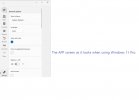
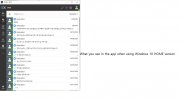
photo_2024-04-19_01-04-491.jpg화면 캡처 2024-04-19 0100571.jpg
 

Attachments

  • 20240215_041308.png
    20240215_041308.png
    380.2 KB · Views: 6
You are describing the Windows Store app vs the Electron app.

Have him click the 3 dots and choose chat. This will open up the Webclient, which can be installed as a PWA, and looks just like the electron app.
 
  • Like
Reactions: Evolute IT
As you pointed out, when you press the three dots and hit chat, it opens a new window in the chrome browser and you can chat from there. And not only do I not get notifications in the web browser, but if I use multiple accounts in the browser, it asks me to log in again, which is very inconvenient.On my computer, I get notifications from the 3cx chat program. I want to install the app on my other computers and get notifications from that app, just like on my computer. How can I do this?
 
And not only do I not get notifications in the web browser
Hit the bell icon and enable notifications
1713537461356.png
but if I use multiple accounts in the browser, it asks me to log in again
Use multiple browsers / profiles (I personally use Firefox Containers)

I want to install the app on my other computers and get notifications from that app, just like on my computer. How can I do this?
Then install the Electron app, but it's going away. Or wait for 3CX to add chat to the store app, they said they will.
 
use Firefox Containers
Ooooh, love those. So useful for when Microsoft decides to change what account you're using, even if you're logged out of it.

Related comment: private/incognito windows work, but only for one account since all such windows share the same session.
 
Hit the bell icon and enable notifications
View attachment 40980

Use multiple browsers / profiles (I personally use Firefox Containers)


Then install the Electron app, but it's going away. Or wait for 3CX to add chat to the store app, they said they will.
I don't think my question was communicated properly.
My question is this.
I want to use the same app as in the first image, but I downloaded the same app as in the second image. How can I use the same app as in the first image? The app I downloaded from the Microsoft Store is the same app as the second image... How can I download the same app as the first image?
 
How can I download the same app as the first image?
In the Microsoft Store search for "3CX." And then presumably close and/or uninstall the other one so two aren't running.

There are:
  • Store app (new)
  • Desktop App (v18, deprecated)
  • Web client (browser)
  • PWA (progressive web app; web client but kind of runs separately from the browser)
  • Legacy v16 Windows app (I think deprecated? It was but came back...)
 
Status
Not open for further replies.

Members Online Now

No members online now.

Forum statistics

Threads
111,843
Messages
589,327
Members
164,679
Latest member
SamadMYK