did not shown in owner role

bit101

Silver Partner
Basic Certified
Joined
Sep 8, 2020
Messages
179
Reaction score
34
Hi togehter,

if a user has the role "owner" then he cannot see the did from any extensions.
We have a customer they has sub admin users and they have to configure new extensions with dids.
Currently dids are not showing.

Does anyone know how to configure that?

thanks & regards :-)
 
If you are referring to a sub-admin, you can assign them the "System Administrator" role, which has fewer permissions than the "System Owner." This will allow them to configure the DIDs.
 
Hi,

system administrator is to much. They should only has Owner role or smaller
 
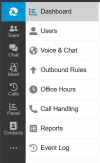
I can see that with owner rights, we can configure the DIDs, as well as access voice, chat, and many other options. 1729763704832.png
 
OK will double check that later again
 
  • Like
Reactions: bit101
Ok i found the problem.

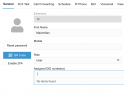
So when the trunk is set to "System Wide" in Limit to section then the did field is empty by the users (pls see screenshot).
When i set the trunk to "Default" then i see the dids.

Bildschirmfoto 2024-10-24 um 13.23.48.png


So we can closed this case, thanks!

regards
 
Ok i found the problem.

So when the trunk is set to "System Wide" in Limit to section then the did field is empty by the users (pls see screenshot).
When i set the trunk to "Default" then i see the dids.

View attachment 44730


So we can closed this case, thanks!

regards
That would be my next suggestion. The department owner has no systemwide access
 
It works now. We can close that ticket. Thanks!
 
  • Like
Reactions: bitn2