DID - Phone assignment disappearing every few days

Status
Not open for further replies.

digsolpartners

SMB User
Joined
Jul 28, 2023
Messages
11
Reaction score
2
Every few days, my DID assignment to my user phone gets unset. The only way I know it's happening is my daily "google verified listing" spam call goes straight to voicemail and my phone doesn't ring.

This is a major issue if I'm not going to get phone calls because the system is resetting my DID -> phone assignment, and I don't always have time to or think to check if it's unassigned itself again.
 
How is the DID "assigned to the phone"? Usually you'd have an inbound rule pointing to a user, then have that user be registered on the phone/mobile app/Webclient.
 
In the admin, user view, there is a drop down for DID assignment to the user. I select the number and save, which assigns it to the user. That's the only way I have in the hosted view to assign the number to the user. Once I make that change, the number rings through like it should.
 
Aaand, it's back. Last it was configured was just before I posted my thread here on the 8th, last night things were peachy, this morning the DID assignment is missing again.
 

Attachments

  • Screenshot 2023-09-19 at 9.30.05 AM.png
    Screenshot 2023-09-19 at 9.30.05 AM.png
    16.3 KB · Views: 6
Hi

Is this a 3CX free install or SMB?

Additionally, are the DIDs you mentioned extra DIDs listed on the trunk, or is this related to only having one number, the main trunk number?
 
Hi

Is this a 3CX free install or SMB?

Additionally, are the DIDs you mentioned extra DIDs listed on the trunk, or is this related to only having one number, the main trunk number?
This is 3CX free. There's no extra DID's (3CX free doesn't support any more than One Trunk, One DID). The number I'm configuring is the main and only trunk number.
 
What is the URL that you use to access your webclient, please?
 
Did you have this instance activated with a license key that was removed?
 
Did you have this instance activated with a license key that was removed?
No. This instance has never been associated with a license key.
 
Can you please re check your subscription as all 3CX instances require one.
 
Sorry I should clarify - I have a license key, just not a paid level.
 
Ok thanks we will check this for you and get back to you.
 
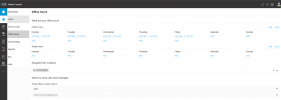
Thanks for the reply. Can you also tell us how the main trunk number is set to route to your extension? For example, do you set the routing for the main trunk number under the admin console > Office hours section as shown below?

1695220794936.png
 
After investigation, we have seen that you are assigning the DID to the user directly, which, if done, will be removed and there is no need to set it to the users directly.

The main trunk number is set to route calls to the group your extension is a member of, so you need to simply set the destinations required for calls to be routed from under the Office Hours section of the admin console as this is where the DID is routed to and assigned to.
 
So here's the thing. Once I knew where to look, I found the documentation for this. But the "call routing" part of your manual is not in the heading. The heading "Call Handling: Call queues, IVR & Ring Groups" caused me to gloss over that section because I didn't need a call queue, IVR or Ring Group. I'm one person.

"Setup your Team" has a section on creating users but says nothing about the office hours.

The fact that there's a direct DID assignment for the user implies to someone who's creating/setting up the user that they can just assign the DID to the user and they're done. In fact, it actually works correctly, which implies to the user that they did it right when they do a test call.

For the system to silently un-set the DID simply because the user is not assigned to an office hours ring group is EXTREMELY frustrating. For the free version to have zero logs, no way to intelligently understand what is going on with the system - even just basic logs here if that's all you want to give us and reserve detailed call logs for the paid group - is honestly a turn-off. I really like 3CX, especially the fact that I was up and running with minimal effort - an enough so that I'm trying to sell it to my customers. Someone who's trying out the software as an evaluation for going to a paid version is not likely to have the patience I have had. (And for what it's worth, I was very, very close to pulling the trigger and moving to another system which is probably more expensive, simply due to the bad experience I was having)

Two suggestions here:
1) You need to set up your UI to allow users to fail gracefully (yes even those damned free users who haven't decided to pay you yet). If the user-direct DID assignment isn't the _usual_ way to configure that, then put an info-dot or a notification. Or maybe better yet, put up a notification if the only call group / office hours doesn't yet have a DID assigned to it or doesn't have a user assigned.
2) Supply basic error logs - enough to troubleshoot a simple routing issue, inbound/outbound call failure, etc. The lack of any logs of any kind is insanely frustrating.

Lastly, stop assuming in your UI design that the user of the interface automatically knows what they need to do. It's very easy to overlook something, and when you're frustrated you're going to be even more prone to do so.
 
Status
Not open for further replies.

Members Online Now

No members online now.

Forum statistics

Threads
111,831
Messages
589,277
Members
164,660
Latest member
RJenkinsROCK