Diference WinClient Q-Manager and Switchboard Queue Calls

Status
Not open for further replies.

Tomas Raska

Forum User
Joined
Aug 18, 2017
Messages
99
Reaction score
10
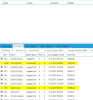
In Web Client, in Switchboard / Queue Calls i see incomming and answered ongoing Calls, in Windows Client only Incoming Calls, when Call somebody answer and talk, then this Call from this liste disappear.

Is this OK?
 
Hello @Tomas Raska

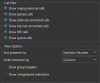
You should be able to see ongoing calls in the Windows client as well. Open the Switchboard and click on the settings icon. Make sure that the appropriate setting is enabled.
 
I have everything checked, but in Q-manager Window I see only waiting calls in queue, not connected calls

upload_2017-12-8_14-16-33.png
 
Once a Queue Call is answered, in a way it "leaves" the Queue and is handed directly to the Extension that answered it. This means that you should check the Group Rights of the extension so that you (the monitorer) have the "Can see group calls" right and that the agents (who you are monitoring) have the "Show calls to group members" right. Of course you must also make sure that your and their extensions are in the same Extension Group.
 
I am in Call Queue defined as Queue manager, but I am not in same Group as people in queue.
And in Webclient I see connected ongoing calls and in Winclient not. This is interesting.
If I am in same Group, then work too Winclient.
 
To actually see the calls of users, you must be in the same Extension Group as the users. Remember, you can be in multiple groups at once having different group rights in each group, so you situation sounds like you need this.

Add your extension to also be in the group where the agents are, enable the rights as mentioned, and depending on whether you want to see your calls, adjust the "Show calls to group members" right of your extension accordingly.
 
Status
Not open for further replies.

Latest Posts

Forum statistics

Threads
111,880
Messages
589,533
Members
164,733
Latest member
HLISolutions