Different Outbound Caller ID does not work in SMB (10 Users) Version 20.0 Update 5 (Build 538)

RobertSe

SMB User
Joined
Feb 24, 2025
Messages
18
Reaction score
0
Hi, we have SMB (10 Users) Version 20.0 Update 5 (Build 538) , with 5 sip trunks setup in the outbound rules. This version only allows to setup one department only, one of our users want to setup their Outbound Caller ID to sip trunk (outbound rule 5), but when they make a outbound call, the number displayed is from the first outbound rule and not the slip trunk outbound caller ID displayed in their User Settings. The second issue is that Ring Group is not working in the Call Handling is not ringing to all users in that Ring Group which is set to Ring All. Please help.
 
Hello @RobertSe

If you want to have multiple outbound rules for different trunks and you want users to be able to select which outbound rule / trunk to use to perform outbound calls then you need to differentiate the outbound rules using a prefix or number length.
Group is mandatory in SMB as it prevents other customers on the same SMB from using your outbound rules and trunks. So the best way is to use a prefix to select an outbound rule and then strip it.

The second issue is that Ring Group is not working in the Call Handling is not ringing to all users in that Ring Group which is set to Ring All. Please help.
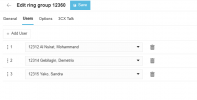
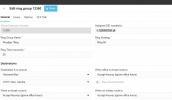
We will need more information to be able to assist with this. Can you send a screenshot of your configuration of the ring group? Also how many users do you have in that ring group and are they all available?
 
Thankyou for your help. Please see the attached image about the call handling

Thankyou for your help, please see the attached images from the call handling .When the incomming call occurs for that DID number, it does not ring for all users within that call handle group. 1740536668533.png
1740536507406.png
 
Thankyou for your help. Please see the attached image about the call handling

Thankyou for your help, please see the attached images from the call handling .When the incomming call occurs for that DID number, it does not ring for all users within that call handle group It only rings a single user within that Ring Group. View attachment 46706
View attachment 46705
It only rings a single user within that Ring Group
 
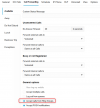
Is it always the same user that rings? If so go to the user settings for the users that do not ring and check if they have the option "Accept calls from Ring Groups" enabled.
Users--> Select User--> Call Forwarding--> Available--> General Options.

This option should be on for all users.
1740555453452.png
 
Is it always the same user that rings? If so go to the user settings for the users that do not ring and check if they have the option "Accept calls from Ring Groups" enabled.
Users--> Select User--> Call Forwarding--> Available--> General Options.

This option should be on for all users.
View attachment 46708
That setting was already selecrted to all users within the group.
 
That setting was already selecrted to all users within the group.
This is an option that is available in all the profiles. So check the away and DND profiles as well. The users may be in a different status and they wont ring in a Ring Group.
 
  • Like
Reactions: YiannisH_3CX
This is an option that is available in all the profiles. So check the away and DND profiles as well. The users may be in a different status and they wont ring in a Ring Group.
Thank you , I followed your instructions, all the Ring Group are ticked in the profiles > fowarding etc. Second the users are members of that Ring All Group. But it still incomming calls come into one extension, (users). Another issue is when you ring into the main ring group numbe (call handling), the dial in outside caller can't hear the phone ringing , it is silent and but the hos office can hear the their phone app ringing. However if that that same number out of the number out of the call handling and set it directly to a user, then the outside caller can hear a ring tone. ...
 
Is it always the same user that rings? If so go to the user settings for the users that do not ring and check if they have the option "Accept calls from Ring Groups" enabled.
Users--> Select User--> Call Forwarding--> Available--> General Options.

This option should be on for all users.
View attachment 46708
Thank you, it was ticked, I unticked it and re-ticked it.
 
Hello @RobertSe

If you want to have multiple outbound rules for different trunks and you want users to be able to select which outbound rule / trunk to use to perform outbound calls then you need to differentiate the outbound rules using a prefix or number length.
Group is mandatory in SMB as it prevents other customers on the same SMB from using your outbound rules and trunks. So the best way is to use a prefix to select an outbound rule and then strip it.


We will need more information to be able to assist with this. Can you send a screenshot of your configuration of the ring group? Also how many users do you have in that ring group and are they all available?
Hi Yiannish, Sorry, I have have tried to strip the outbound number but it is still not working.SMB has strick limitations. The user is trying to dial out from phone number 0298202800 which is selected in the Outbound Called ID within her profile and also set as a prefix in the Outbound Rules. I think the issue is that user is locked into the signle Prestige Tiling Group and when I delete that user from that Presgite Tiling Group, and click on save, then re-open that user it re-appears back in that group. See attached images
 
Last edited by a moderator:
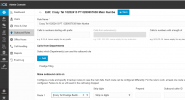
Hi Yiannish, Sorry, I have have tried to strip the outbound number but it is still not working.SMB has strick limitations. The user is trying to dial out from phone number 0298202800 which is selected in the Outbound Called ID within her profile and also set as a prefix in the Outbound Rules. I think the issue is that user is locked into the signle Prestige Tiling Group and when I delete that user from that Presgite Tiling Group, and click on save, then re-open that user it re-appears back in that group. See attached images View attachment 46730
View attachment 46731
The only way I can get this function to work is to go to the primary Outbound Rules and then select that phone number in that rule. However this effect all other users. I want to have two functional Outbound Rules to works per each selected users... see attached. 1740612229493.png
 
Your outbound rules are not correctly configured, that is why you cannot select them. What i meant was to create outbound rules with prefixes where you can select an outbound rule using a prefix.
For example to select Rule 1 you need to dial 90298202800 and strip 1 digit so the 9 is striped.

1740641428512.png

For outbound rule 2 you do the same but select a different prefix like 8 for example. If you put the whole number as prefix and then strip it then it will not work as you are sending the wrong number to the provider.

I think the issue is that user is locked into the signle Prestige Tiling Group and when I delete that user from that Presgite Tiling Group, and click on save, then re-open that user it re-appears back in that group
That is by design. For SMB your outbound rule cannot be created without a group. Even if you delete it the system will readd it.


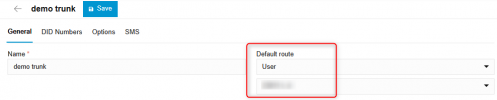
Regarding the Ring Group, is the user that's ringing set as the destination of the default route in the trunk? So open your trunk settings and check the default route. Is that user set there?
1740641760085.png
 
Your outbound rules are not correctly configured, that is why you cannot select them. What i meant was to create outbound rules with prefixes where you can select an outbound rule using a prefix.
For example to select Rule 1 you need to dial 90298202800 and strip 1 digit so the 9 is striped.

View attachment 46738

For outbound rule 2 you do the same but select a different prefix like 8 for example. If you put the whole number as prefix and then strip it then it will not work as you are sending the wrong number to the provider.


That is by design. For SMB your outbound rule cannot be created without a group. Even if you delete it the system will readd it.


Regarding the Ring Group, is the user that's ringing set as the destination of the default route in the trunk? So open your trunk settings and check the default route. Is that user set there?
View attachment 46739
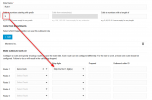
Thankyou. The Ring Group is now correctly correctly. However we stillhave an issue witht the outbound rules. I have added 90298202800 and strip 1 the first digit, but it did not work. I have change the
number with the voice & chat profile to inlcude the extra digit 9, I have also added extra digit 8 to the seocond call handler but it still defualts to the first call handler profile. see the below image. Thankyou in advance.
 
Last edited by a moderator:
First of all please stop posting screenshots with emails, numbers and authentication details as you are going looking for trouble. These are sensitive information that should not be shared in public forums.

Second why are you adding numbers to your DIDs? You need to add the prefix number to the number you are dialing not your DID.

At this point I would recommend hiring a partner to help you with the configuration and troubleshooting of your instance. You will find plenty on this forum.
 

Members Online Now

No members online now.

Forum statistics

Threads
111,831
Messages
589,277
Members
164,660
Latest member
RJenkinsROCK