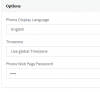
One is running on an obsolete template. Update the template on the second system and the additional options will become available. The template update should show up under templates.
I tried copying over templates from the first system and borked my entire setup. The existing phones now show as "ASTRA" with no MAC address assignment.
Just finished getting functionality back. I had to manually provision the phones. The phones won't show in the Phones tab for assignment after resetting to factory. I have to manually insert the provisioning link into the phone's config page. Additionally, I'm seeing 2 "T23G" templates in the drop down. I manually have to configure each extension via the Phone provisioning tab.
There was no need to copy templates from a different installation as the management console will check for updates for newer version of templates automatically. The phones showing up as Astra means that the templates were not recognised and the management console defaulted to the first available template which is Astra.
I had updated the templates from the "Check Updates" function and I was not seeing the options that I was expecting to see as in my other v15.5 installations.
After you updated the templates did you try to provision a new phone or re-create an existing one? You need to do this as the already configured extension will not auto update. If that doesn't work it could be either a browser or cache issue so it is recommended opening an incognito tab from a supported browser and check from there