Digital Receptionist is Locked on Virtual Extension?

Status
Not open for further replies.

MikeBAM

Free User
Joined
Jan 25, 2022
Messages
22
Reaction score
3
I've been working to upgrade our 3CX system from (I think) v14 to v16, but I've had some difficulties. I arrived at this company after-the-fact and the last tech didn't leave any instructions or documentation to our phone system layout, and I've been left alone trying to solve it all with no prior experience in phone systems. We have two gateways, one Patton and one Grandstream, which seem to be splitting one phone line into 5 simultaneous lines. We also have some boxes which are unlabeled aside from a company brand "Arris" on them, I cannot find them on the network so I'm currently unsure what they do.

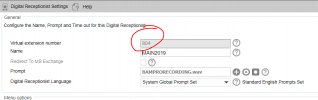
Now I'm currently working on some other settings and fixes and I noticed the digital receptionist is locked on a virtual extension and cannot be edited. I'm guessing one of our pieces of equipment has locked it for some reason? We were looking to start programming "company hours" into the system and need to be able to build a new receptionist and 'swap the extensions out' eventually...

Any assistance on this would be appreciated. We use yealink T29G phones, mostly outdated firmware (I'm also working on that).
 
Hopefully to v18? It went 14->15->16->18.

The DRs are not real (user) extensions so there's no need to change numbers. They are not usually dialed except while testing changes. The DR typically directs the call to an actual extension, ring group, queue, etc. The SIP trunk or inbound rule would normally route the inbound call to a DR, just change to a different DR there.
 
v14 cannot jump straight to v18, so I had to start by moving it up to v16. Calls coming in go straight to this auto-attendant and otherwise just time out to an extension voicemail. I need to completely redo the auto-attendant, hence I figured designing a new one and then just "swapping" the extensions would work as to avoid deleting. Unfortunately, it does not let me edit the extension, which is why I was guessing one of our phone boxes was the culprit.
 
Create your new Digital Receptionist. On the SIP trunk, set "Route calls to" to go to the new DR extension. Then you can delete the old DR at your convenience.

No extension numbers are editable after creation, whether it's a user extension or not.
 
  • Like
Reactions: ChrisC_3CX
v14 cannot jump straight to v18, so I had to start by moving it up to v16
Regarding the upgrade, do bear in mind that from v14 you have to go to v15.5 SP6 first. From there you can now take a backup nd go straight to v18: https://www.3cx.com/blog/releases/direct-upgrade-v18/

You can download 3CX v15 from here and from there on it should be a matter of, taking a backup, uninstalling old version and installing new using the backup.

Make sure that the machine will be compliant to our hardware requirements and running the 3CX Supported OS. Should you need to switch to a new machine due to the above, I recommend performing the upgrade on the new machine, having shutdown the old one before starting to use as a safety net should something go wrong. Once done, boot the old machine up with no internet connection and uninstall v14.

Note: Do keep all backups taken in a safe location and always perform such tasks during out of office hours.
 
Create your new Digital Receptionist. On the SIP trunk, set "Route calls to" to go to the new DR extension. Then you can delete the old DR at your convenience.

No extension numbers are editable after creation, whether it's a user extension or not.
What determines which digital receptionist is used? Is it controlled by an external piece of equipment, like one of the closet "boxes" setting the virtual ext to 804, or is it controlled via 3CX?
 
Regarding the upgrade, do bear in mind that from v14 you have to go to v15.5 SP6 first. From there you can now take a backup nd go straight to v18: https://www.3cx.com/blog/releases/direct-upgrade-v18/

You can download 3CX v15 from here and from there on it should be a matter of, taking a backup, uninstalling old version and installing new using the backup.

Make sure that the machine will be compliant to our hardware requirements and running the 3CX Supported OS. Should you need to switch to a new machine due to the above, I recommend performing the upgrade on the new machine, having shutdown the old one before starting to use as a safety net should something go wrong. Once done, boot the old machine up with no internet connection and uninstall v14.

Note: Do keep all backups taken in a safe location and always perform such tasks during out of office hours.
Maybe it was v15.5, I honestly cannot recall. I presume moving from v15.5 up to v18 once everything is settled is a good idea.

I've got both phone servers running simultaneously, and I've been hot swapping them in and out to play with on our phone network. I recognize there isn't a huge point to doing this since I actually have to provision the phones to the new server, which has been a pain since I've needed to factory reset each phone to reach it's internal webpage to upgrade said firmware.

The machine is sufficient, it has handled the new server so far.
 
Maybe it was v15.5, I honestly cannot recall.
From the screenshot you provided it seems it was not v15.5.

I presume moving from v15.5 up to v18 once everything is settled is a good idea.
Nonetheless, if everything seems to be working fine moving onwards from there would probably be ok. If it was v14 though I do recommend going through v15.5 if you find time. If not, at least keep the v14 backup just in case.

I've got both phone servers running simultaneously,
I have to mention that this is strongly recommended against. This may not only cause issues with the FQDN, SIP Trunk and extension registration, but will also cause issues with activation and the License Key.

The machine is sufficient, it has handled the new server so far.
Regardless of whether it seems to be working fine, we strongly recommend it complies with our requirements as only then can we guarantee normal 3CX operations, compatibility with future updates and a generally trouble-free experience when it comes to system performance. At the same time, you would also be keeping the PBX a 3CX Supported configuration.
 
From the screenshot you provided it seems it was not v15.5.


Nonetheless, if everything seems to be working fine moving onwards from there would probably be ok. If it was v14 though I do recommend going through v15.5 if you find time. If not, at least keep the v14 backup just in case.


I have to mention that this is strongly recommended against. This may not only cause issues with the FQDN, SIP Trunk and extension registration, but will also cause issues with activation and the License Key.


Regardless of whether it seems to be working fine, we strongly recommend it complies with our requirements as only then can we guarantee normal 3CX operations, compatibility with future updates and a generally trouble-free experience when it comes to system performance. At the same time, you would also be keeping the PBX a 3CX Supported configuration.
Only one is actively connected to the network at a time, hence the hot swapping. I've only been doing so to work on the new server.

I'll drop a final backup of the v14 in our cloud storage just in case, good call.

The server informed me it was running fine on the new machine. The new server is weaker than the current outdated server for sure, but IMO I don't think it takes an $800 Dell OptiPlex to run a 5 simul-line phone server (correct me if I'm wrong, as I'm basing this off the initial performance I saw on the new machine).
 
I don't think it takes an $800 Dell OptiPlex to run a 5 simul-line phone server (correct me if I'm wrong, as I'm basing this off the initial performance I saw on the new machine)
Our general guidelines are what is mentioned here and these are mostly based on the number of extensions rather than sim calls. It goes without saying that the number of extensions is realistically not the only factor that comes into play but it is enough for us to estimate the system resources required for a typical 3CX Instance.

If you deem that this particular setup is not that resource demanding then you are of course free to use whatever you wish, however I am obligated to inform you that, should 3CX tech support be requested for this deployment this is a matter that may come up and potentially have a support case suspended until it is rectified so please do so at your own discretion.
 
What determines which digital receptionist is used? Is it controlled by an external piece of equipment, like one of the closet "boxes" setting the virtual ext to 804, or is it controlled via 3CX?
A SIP trunk has its configuration for inbound routing. Also an Inbound rule can be set up for alternate call routing.
 
A SIP trunk has its configuration for inbound routing. Also an Inbound rule can be set up for alternate call routing.
So one of the boxes in the closet has the number "804" set somewhere? Bear with me, I wasn't taught phone systems during my training (haha).
 
Check PSTN Gateways, maybe using ISDN2 or PSTN lines
 
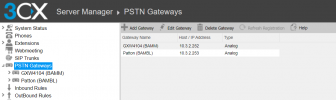
No luck, we have two gateways with one holding 1 call line and the other holding 4. Don't see a lot of configurable settings.

I can go rummage around in their admin manufacturer pages and see if anything jumps out. Didn't see anything last time I dug through them.
 
Check PSTN Gateways, maybe using ISDN2 or PSTN lines
I'm not seeing anything that would suggest a manually entered agent or extension.
 
To help clear things up a bit. The boxes you mention are probably the PSTN gateways, very simply put, they convert the Analogue line to a digital one (SIP) so that the 3CX PBX recognizes it. That said, if incoming calls work in general, you should not need to do anything with those so leave them as is.

Everything else, IVR extensions, normal extensions, routing of an incoming call in general, is handled by the 3CX PBX so you should be able to configure everything from the 3CX Management Console.

So, let's say that what is happening currently is something like this:

"Incoming call from Provider >> Goes through PSTN Gateway >> Reaches 3CX >> Goes to IVR 804 >> Is routed based on selection"

It means that, anything from the "Reaches 3CX" point onwards you can and must only configure via 3CX.

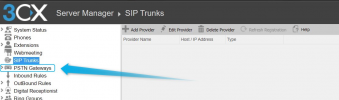
Going back to what @Saqqara said, I think he was referring to the "PSTN Gateways" section in the Management Console:
1643278260535.png


Do you have anything under that section? If you are receiving external calls then it means you must have something set on the PBX and if you are using actual gateways then the "PSTN Gateway" section is where the configuration for incoming calls probably lies. It is in that section where you are probably specifying that calls should go to IVR 804 and it is there where you should be able to change this routing.
 
I've dug through the web interfaces and the settings in 3CX for those gateways, nothing jumps out at me. I don't see anything setting the digital receptionist or the line 804.

I've gotten the gist of how this logically works, dividing one incoming line into multiple "virtual lines" using the PSTN gateways. Why and how it works is beyond me, but the logic I think I've caught at last.

pstn.PNG
 
Status
Not open for further replies.

Forum statistics

Threads
111,974
Messages
590,083
Members
164,901
Latest member
Silent_Guru