





We’ve made upgrading even easier! Administrators can now upgrade end-of-life version 15.5 instances directly to the latest V18 release.
No middle step
Previously, when upgrading from version 15.5 to 18, admins needed to first backup and restore the configuration onto a v16 instance. Then carry out the same backup and restore process again from v16 to v18. Now they can skip the middle step of upgrading to v16 entirely by going straight from v15.5 to v18.
How to upgrade to V18 Update 2
Existing on-premise and private cloud installations can download 3CX v18 Update 2 on Windows and Linux on Debian 10 and benefit from a direct upgrade from 15.5 to v18 with no middle stage.
Upgrade using ‘Hosted by 3CX’
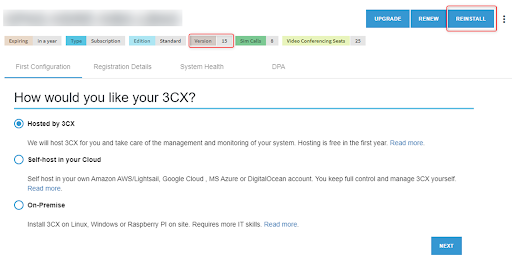
Why not upgrade to v18 even easier using the automated process when moving to ‘Hosted by 3CX’. The upgrade can be run directly from the customer portal and customers will also benefit from the first year of hosting for free. Simply click on “Reinstall” under “My Subscriptions” and follow the steps. Read the manual here for more information on how to migrate.









 Copyright © 2026