Solved Digital Receptionist Menu Missing

Status
Not open for further replies.

rblackburn

Customer
Joined
Apr 27, 2022
Messages
3
Reaction score
1
We just recently upgraded from V16 to V18.3 and our IVR / Digital Receptionist information came over and works great. The only issue is we do not have the Digital Receptionist menu so we can not edit or change them. We also can not edit or control our call que's.

Any ideas how to get those menu items back so we can edit our system. Currently running Professional on premise 3CX.
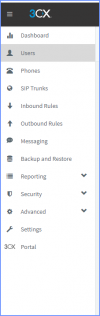
 
Under licensing , try refreshing your license
 
Under licensing , try refreshing your license
I had tried that in the past but just gave it another shot and no luck. I have rebooted the server as well hoping something along those lines would help but it still isn't showing.

1651090336587.png
 
Are you logged in as the server admin? Is there an A in the upper right corner, where you'd click to log out? 1651091919547.png
 
Are you logged in as the server admin? Is there an A in the upper right corner, where you'd click to log out? View attachment 29821
That is what the problem was. My password manager started using my personal login instead of the admin and I didn't catch it.

I appreciate it. Thanks for the help.
 
  • Like
Reactions: ChrisC_3CX
Status
Not open for further replies.

Forum statistics

Threads
111,974
Messages
590,081
Members
164,899
Latest member
mazet