Digital Receptionist

Garrick

Free User
Joined
Apr 3, 2025
Messages
9
Reaction score
0
Hi group,

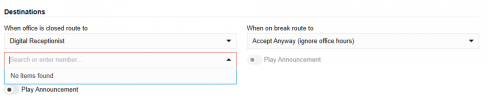
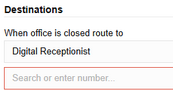
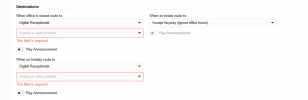
i am trying to configure my digital receptionist for when my office is closed but it's asking me for a number and is a required field.

what number should i add? or how to do that? see attached screenshot

thanks in advanced
1743897044583.png

1743897083242.png
 
Choosing to send to a DR there, you’d pick the other DR from the list. The DRs have extension numbers.
 
Hi, I am not 100% clear from your screenshot precisely where you are in the web admin UI. But. I get the feeling maybe you are putting cart before the horse? ie,

- first go into "call handling" and build a new digital reception / IVR - this will be setup as per your desired config, add a voice recording greet message, add some call flow logic such as "press 1 > routes to ext 100, press 2 routes to ext 200" etc.
- then you will have a new "EXT Virtual#" associated with this IVR/digital reception
- then finally you may configure inbound call routing, for example DID# 123-456-7890 > will dump into Virtual_EXT 8001 which is your digital reception/IVR that you prepped first (?)

more or less I believe the hints here > https://www.3cx.com/docs/manual/ivr/ are good in terms of how to get it working

Unless I am misunderstanding how you are approacing this (?)

Tim
 
Hi thanks for your reply,

that screenshot is in the call handeling section, add DR.

when adding the DR in the call handeling section after adding call flow logics and all under that section you would get destination.

when i choose destination for out of office as DR i will get that required field asking me to enter a number or search for one. i am not able to add anything and that field is empty
 
Hi, I am not 100% clear from your screenshot precisely where you are in the web admin UI. But. I get the feeling maybe you are putting cart before the horse? ie,

- first go into "call handling" and build a new digital reception / IVR - this will be setup as per your desired config, add a voice recording greet message, add some call flow logic such as "press 1 > routes to ext 100, press 2 routes to ext 200" etc.
- then you will have a new "EXT Virtual#" associated with this IVR/digital reception
- then finally you may configure inbound call routing, for example DID# 123-456-7890 > will dump into Virtual_EXT 8001 which is your digital reception/IVR that you prepped first (?)

more or less I believe the hints here > https://www.3cx.com/docs/manual/ivr/ are good in terms of how to get it working

Unless I am misunderstanding how you are approacing this (?)

Tim

Hi thanks for your reply,

that screenshot is in the call handeling section, add DR.

when adding the DR in the call handeling section after adding call flow logics and all under that section you would get destination.

when i choose destination for out of office as DR i will get that required field asking me to enter a number or search for one. i am not able to add anything and that field is empty
 
see recording if possible
 

Attachments

You're choosing to send the call to a different DR here so you need to specify its extension number, e.g. 84.

1743951509135.png

Or you can choose to send the call to a ring group, extension, queue, voicemail, etc.
 
You're choosing to send the call to a different DR here so you need to specify its extension number, e.g. 84.

View attachment 47347

Or you can choose to send the call to a ring group, extension, queue, voicemail, etc.
Hi Sir,

thanks but i am still confused on this... since i only want the DR to work when my office i closed and can't really understand what to do here.

The whole issue is that i bought this system about a month ago from a gold partner, he got paid and never finished configuring my system. he is not answering me and stuff so now i am stuck here and do not want to do. trying to figure this our myself. but it is kinda of frustrating.
 
You're choosing to send the call to a different DR here so you need to specify its extension number, e.g. 84.

View attachment 47347

Or you can choose to send the call to a ring group, extension, queue, voicemail, etc.
ok i think i got it,

i do not need to use the destination section and i need to choose my phone number in the DID section otherwise it would overwrite it if no DID is selected
 
In the trunk you can send the call to a default route. If you set that to DR 83 then all calls will go to the DR.

You could, for instance, set the default route to send the call to a Ring Group with just your extension in it. Then in that ring group, set "When office is closed route to" and "Destination if no answer" to DR 83. Or whatever is appropriate.
 
In the trunk you can send the call to a default route. If you set that to DR 83 then all calls will go to the DR.

You could, for instance, set the default route to send the call to a Ring Group with just your extension in it. Then in that ring group, set "When office is closed route to" and "Destination if no answer" to DR 83. Or whatever is appropriate.
Allright thx
 

Members Online Now

No members online now.

Forum statistics

Threads
111,831
Messages
589,277
Members
164,660
Latest member
RJenkinsROCK