- Joined
- Apr 13, 2023
- Messages
- 5
- Reaction score
- 1
We're pleased to announce that Dimensions Call Analytics is now available for 3CX. Dimensions provides the tools to analyse your customer's experience, not just historically, but it allows you to view interactions in real-time, allowing decisions to be made right when your customers need you.
With Dimensions Call Analytics, you gain valuable insights into how and when your customers are communicating, giving you the ability to make evidence-based decisions.
Using a combination of both Real-Time and Historical data your business can always be one step ahead. Predicting high traffic times to ensure staff are available, reduces the number of lost and unreturned lost calls to your business.
Dimensions is hosted within Microsoft Azure and fully managed by Dimensions Technologies. Our PBX Collector is installed alongside 3CX, creating a Real-Time Web Socket connection to Dimensions. All data is securely stored and encrypted during transit and at rest, with historical call data being retained indefinitely provided there is an active subscription. Once installed the PBX collector can be updated via the Reseller portal should this be required, meaning there is minimal requirement to access the 3CX host itself after initial installation.
Key features:
Full Customization
Choose from hundreds of different statistics, then filter them to show exactly the information needed to measure the performance of your staff.
Call Lists & Summaries
Analyse call & user data using pre-defined & customizable templates.
Supervisor Dashboard
Monitor live user & call information on a fully customizable Dashboard.
Queue Status
The queue grid provides information about the status of each queue on the system, how many calls have been processed/lost, how many calls are queuing, and how many agents are available.
Unreturned Lost Call Grid
Don't let missed opportunities or poor customer experiences hold your business back.
An up-to-date view of all Unreturned Abandoned Calls. This fully dynamic list automatically removes numbers once they've received a call-back or have redialled and have been answered.
Alarms
Configure alarms to warn of service level changes.
Automated Schedules
Configure reports to be delivered automatically by email.
Call Recordings
Access call recordings directly from reports.
Amazon FireTV Deployment
Use the dedicated application for Amazon FireTV to render a Wallboard without the need of a PC. This simplifies deployment and reduces the cost of ownership.
Below are a few example screenshots of the Dimensions Real-Time Dashboard running in Dark Mode, which is fully customisable with hundreds of statistics and tile types.
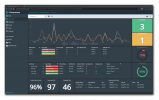
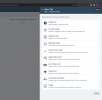
Available Dashboard Tile Types
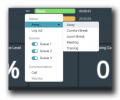
The Agent Grid provides a details overview of agent activity and status.
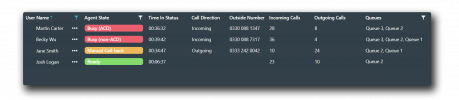
From the Agent grid, a user of the Dimensions Real-Time Dashboard is able to control and manage Agents.
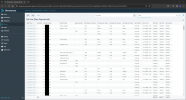
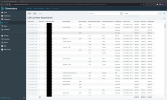
Historical Reporting Call List Report
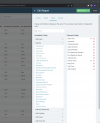
Configurable Report Fields (available fields and field categories differ based on the report being used)
Further information can be found here: https://www.dimensionstechnologies.com/solutions/3cx-call-analytics/
Along with details on how to partner with us which can be found here: https://www.dimensionstechnologies.com/partners/partner-with-us/
Our datasheet on the product can be download here: https://www.dimensionstechnologies.com/datasheets/dimensions-3cx-analytics-support-v1.1-en-gb.pdf
Video Overview:
Please note, Dimensions Call Analytics for 3CX is only supported on Self-Hosted 3CX, due to root access being required.
Please get in touch if you have questions of queries, we'd love to work with you!
With Dimensions Call Analytics, you gain valuable insights into how and when your customers are communicating, giving you the ability to make evidence-based decisions.
Using a combination of both Real-Time and Historical data your business can always be one step ahead. Predicting high traffic times to ensure staff are available, reduces the number of lost and unreturned lost calls to your business.
Dimensions is hosted within Microsoft Azure and fully managed by Dimensions Technologies. Our PBX Collector is installed alongside 3CX, creating a Real-Time Web Socket connection to Dimensions. All data is securely stored and encrypted during transit and at rest, with historical call data being retained indefinitely provided there is an active subscription. Once installed the PBX collector can be updated via the Reseller portal should this be required, meaning there is minimal requirement to access the 3CX host itself after initial installation.
Key features:
Full Customization
Choose from hundreds of different statistics, then filter them to show exactly the information needed to measure the performance of your staff.
Call Lists & Summaries
Analyse call & user data using pre-defined & customizable templates.
Supervisor Dashboard
Monitor live user & call information on a fully customizable Dashboard.
Queue Status
The queue grid provides information about the status of each queue on the system, how many calls have been processed/lost, how many calls are queuing, and how many agents are available.
Unreturned Lost Call Grid
Don't let missed opportunities or poor customer experiences hold your business back.
An up-to-date view of all Unreturned Abandoned Calls. This fully dynamic list automatically removes numbers once they've received a call-back or have redialled and have been answered.
Alarms
Configure alarms to warn of service level changes.
Automated Schedules
Configure reports to be delivered automatically by email.
Call Recordings
Access call recordings directly from reports.
Amazon FireTV Deployment
Use the dedicated application for Amazon FireTV to render a Wallboard without the need of a PC. This simplifies deployment and reduces the cost of ownership.
Below are a few example screenshots of the Dimensions Real-Time Dashboard running in Dark Mode, which is fully customisable with hundreds of statistics and tile types.
Available Dashboard Tile Types
The Agent Grid provides a details overview of agent activity and status.
From the Agent grid, a user of the Dimensions Real-Time Dashboard is able to control and manage Agents.
Historical Reporting Call List Report
Configurable Report Fields (available fields and field categories differ based on the report being used)
Further information can be found here: https://www.dimensionstechnologies.com/solutions/3cx-call-analytics/
Along with details on how to partner with us which can be found here: https://www.dimensionstechnologies.com/partners/partner-with-us/
Our datasheet on the product can be download here: https://www.dimensionstechnologies.com/datasheets/dimensions-3cx-analytics-support-v1.1-en-gb.pdf
Video Overview:
Please note, Dimensions Call Analytics for 3CX is only supported on Self-Hosted 3CX, due to root access being required.
Please get in touch if you have questions of queries, we'd love to work with you!