- Joined
- Oct 24, 2019
- Messages
- 32
- Reaction score
- 11
Hi,
I have come across some setting in 3CX in combination with Yealink phones that I find not very straight forward. I'll try to explain in my best English.
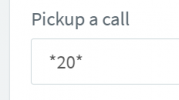
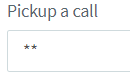
In 3CX you have the ability to pickup a call from another extension with dial code *20*(default). This will route the longest waiting call present on the 3CX PBX to you. Ofcourse all settings and rights need to be correctly set for this. Let's presume for now that this is the case. To pickup a call specific to an extention you can use this dial code followed by the extensionnumber. This works as it supposed to work.
Now for my 'problem';
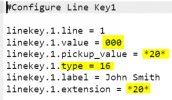
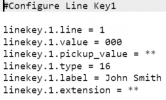
When I set a BLF field on a Yealink phone for my colleague I have the ability to pickup calls (to him) via this button. The 'problem' I now experience is that 3CX configures this button with only the pickup dial code set in 3CX(*20* default).
If another call to another colleague, from which I also have the rights to pickup, is made earlier I get that other call rerouted to me instead of the call being made to my collegue under the BLF.
This I find strange behaviour, since I want to pickup the colleagues call that is under the BLF button.
So in my opinion, 3CX should set the field 'linekey.2.extension =' to *20*<extension> instead of just *20*.
Is there a reason 3CX populates this field with just *20*? Or is this perhaps adjustable in management console?
Best regards,
Randy Daeseleer
Technica Groep
I have come across some setting in 3CX in combination with Yealink phones that I find not very straight forward. I'll try to explain in my best English.
In 3CX you have the ability to pickup a call from another extension with dial code *20*(default). This will route the longest waiting call present on the 3CX PBX to you. Ofcourse all settings and rights need to be correctly set for this. Let's presume for now that this is the case. To pickup a call specific to an extention you can use this dial code followed by the extensionnumber. This works as it supposed to work.
Now for my 'problem';
When I set a BLF field on a Yealink phone for my colleague I have the ability to pickup calls (to him) via this button. The 'problem' I now experience is that 3CX configures this button with only the pickup dial code set in 3CX(*20* default).
If another call to another colleague, from which I also have the rights to pickup, is made earlier I get that other call rerouted to me instead of the call being made to my collegue under the BLF.
This I find strange behaviour, since I want to pickup the colleagues call that is under the BLF button.
So in my opinion, 3CX should set the field 'linekey.2.extension =' to *20*<extension> instead of just *20*.
Is there a reason 3CX populates this field with just *20*? Or is this perhaps adjustable in management console?
Best regards,
Randy Daeseleer
Technica Groep