- Joined
- Jun 4, 2024
- Messages
- 15
- Reaction score
- 0
Hello,
I have a paid subscription with 3CX, so I’m unsure why I’m restricted to this group, anyway
We’ve been using 3CX for a little under a year, and we’ve noticed that some users are frequently placing themselves in “Do Not Disturb” (DND) mode throughout the day. This creates an issue with call distribution in the department queue, as calls are not being shared evenly. In some cases, we’ve found that all members of a queue have set themselves to DND, pushing their calls to the overflow queue.
I’d like to know what options are available to prevent users from placing themselves in DND or other statuses that stop them from receiving calls.
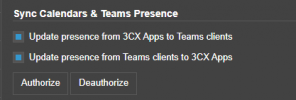
Additionally, we have Office 365 integration, where 3CX syncs users’ Teams presence/status. I’m wondering if the Teams status overrides manually set 3CX statuses like "Do Not Disturb." For example, if a user is marked as available on Teams, will it override their DND status in 3CX?
Thanks!
I have a paid subscription with 3CX, so I’m unsure why I’m restricted to this group, anyway
We’ve been using 3CX for a little under a year, and we’ve noticed that some users are frequently placing themselves in “Do Not Disturb” (DND) mode throughout the day. This creates an issue with call distribution in the department queue, as calls are not being shared evenly. In some cases, we’ve found that all members of a queue have set themselves to DND, pushing their calls to the overflow queue.
I’d like to know what options are available to prevent users from placing themselves in DND or other statuses that stop them from receiving calls.
Additionally, we have Office 365 integration, where 3CX syncs users’ Teams presence/status. I’m wondering if the Teams status overrides manually set 3CX statuses like "Do Not Disturb." For example, if a user is marked as available on Teams, will it override their DND status in 3CX?
Thanks!