Disable the Chrome extension for my website

Status
Not open for further replies.

piloos

New Customer
Joined
Feb 5, 2021
Messages
3
Reaction score
0
The 3CX click to call extension detects numbers on our web platform which aren't numbers and messes up the UI/UX.

I know that we can disable the detection on individual basis by adding our domain to the extension ignore-list. But this is not a scalable solution as it would require us to inform all our visitors that they need to add our website to their ignore list. This is not good reputation for 3CX either...

Can we add something to our HTML (eg. a body class 'ignore-3cx') to let the extension now that this website does not contain any phone numbers.
 
What you are asking for, which I believe is an option for "Auto-detect only on these sites", is currently not possible.

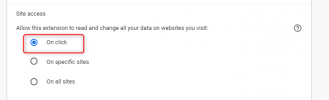
What you can do though is use this option:
1612528682907.png

Basically the plugin will never auto-detect on a page, and will only parse the page when you press the Extension icon on the top menu.
 
Hi thanks for your answer, but this is still an action that the extension user needs to take.

I want to configure the website that I host (eg. www.myplatform.com) in such way that the 3CX extension does not attempt to detect phone numbers on my website for any user. Some kind of marker that says "dear 3CX extension, please stay away from this page, these aren't phone numbers"
 
Unfortunately that is not possible. The Browser Extension is something that runs client-side, so it needs to be the user's decision to disable the parsing.

If you are in contact with the users and you making some kind of interface for them and they are using 3CX, then you need to tell them to use my previous suggestion.

A "hack" you could try is using this:
Code:
<a href="sms:123456789">123456789</a>
but I can't guarantee that we will not parse that in the future.
 
Thanks for the answer. We will put in our FAQ that users should whitelist our website when using the 3CX extension.
I would highly recommend this as a product feature for your extension. There will be more websites suffering the same issue. Other extensions that interfere with the DOM allow a website builder to indicate that the extension should ignore the fields (eg. LastPass allows you to put data-lpignore="true")
 
Status
Not open for further replies.

Forum statistics

Threads
112,349
Messages
592,026
Members
165,512
Latest member
gmacinit