Solved Disconnected all the time after 30/40 sec

Status
Not open for further replies.

dams

Customer
Basic Certified
Joined
Mar 18, 2020
Messages
43
Reaction score
43
Dear support
I have been having a problem with webmeeting for some time.
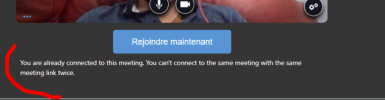
I noticed that when the home page is slow (screenshot), I am disconnected from the session about 30/40 seconds later.
I come back to the home page and it says "you are already connected to this meeting".
I can't reconnect right away, I have to wait a while.
I disabled the firewall, rebooted my computer, turned off the vpn, but I can't hold a session any longer.
For my colleagues it's working fine
I try to change the MCU region from Europe to UK but the same result.

Any idea?
Thank for your help

PS:
My version: 18.0 (Build 314) Pro


1643968372545.png
1643968402919.png
 
Hi @dams ,

I can't reconnect right away, I have to wait a while.
How long is "a while"? If it is a minute or so, that is expected if you were abruptly disconnected, because the MCU servers need time to realize you are no longer connected.
The fact that you are being abruptly disconnected is probably also the reason you are getting kicked out of the meeting in the first place.

turned off the vpn
Why are you using a VPN? Can you uninstall all VPN clients you have on your PC, then reboot it to make sure all network routing is back to normal and check if you have the same problem?
VPN connections can occasionally be slow, especially when transmitting high bandwidth traffic like audio/video.
 
Dear Nick,
thanks for your quick reply
"How long is "a while"?" about 20 sec, it's not possible to click on the button, like the button is a simple div.
Same result without VPN, I disable also the AV.

It only disconnects me when I am in communication with someone,
if I leave webmeeting open without having a participant, it does not disconnect.
Another test, 2 computers on the same network, it does not disconnect (I tried with another computer at home)
It only happens when I am in communication with a remote participant.
I also reboot my wifi and internet connection
I tried with Edge, no succes
 
"How long is "a while"?" about 20 sec, it's not possible to click on the button, like the button is a simple div.
Same result without VPN, I disable also the AV.
Assuming you are getting disconnected, then 20 seconds to allow you to reconnect is reasonable given that the process I described needs to happen. The thing is now, why you are getting disconnected in the first place.

Does this happen to ANY meeting you do with a remote participant, or only on some meetings?
Also do you have this when you are the Organizer of the meeting or also when you are a Participant of a meeting that someone else has set up?
 
I have made a lot of test, and nothing changed.
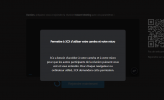
I realized also that when somebody try to call me (on the pbx part), the popup windows raised well, but impossible to answer, I click a couple of time on the green button, and not action, the button reacts only after 10 seconds and answer the call.
The red button, to refuse the call, works without any issue.
I don't know if it's linked with my first problem, but maybe it will help you.
 
I have made a lot of test, and nothing changed.
I realized also that when somebody try to call me (on the pbx part), the popup windows raised well, but impossible to answer, I click a couple of time on the green button, and not action, the button reacts only after 10 seconds and answer the call.
The red button, to refuse the call, works without any issue.
I don't know if it's linked with my first problem, but maybe it will help you.
These 2 things that you are describing are generally unrelated, but one of the few things they have in common is the network they are on, so it could be something on the network or Firewall blocking some kind of traffic that is causing these things.

At some point you said that if your 2 computers are on the same network you don't have a problem with disconnections. Is your 3CX Server on the same LAN as the 2 computers as well?

Same question for the 3CX client that you said the Green button does not respond, does it only happens to users that are on a different network from the 3CX Server, or does it happens in LAN users too?
 
Finally, It seems it a bug with windows. (it's only with one computer)
  • When Wifi connected to hotspot: KO
  • When Ethernet is plugged AND WIFI enabled AND Wifi not connected to hotspot: KO
  • When Ethernet is pugged AND WIFI disabled : OK !!!!
So it's like the wifi card made something strange.
The most important thing is the issue appears when the wifi card is activated but not connected to an hotspot (so not additionnal route)

I remove the Intel Wifi Killer application because this tool do some optimisation on the packet workflow, no success.

Any ideas ?
Thanks
 
Hi!

At least you have zeroed in on the problem now. The things I would personally check is:
  • Update WiFi adapter drivers (not though Windows, find latest on manufacturer website)
  • Check if user has enabled any "Ultra Super Speed" option that sometimes enables NIC Teaming in the background
  • Disable any power-saving options on the WiFi adapter level
  • Reboot the Router/Access Point you are connecting to and maybe also try setting a static WiFi channel and disable any roaming capabilities temporarily.

Other than this though, I would suggested seeking the advice of a hardware expert for more suggestions.
 
Thanks Nick for you help
It seems now it's solved without doing anything special, I don't know if it's linked with the last update of 3cx and the webmeeting.
 
  • Like
Reactions: NickD_3CX
I am very glad to hear this!

Truth is our WebMeeting platform is constantly being worked on and improved. One of the benefits of some parts of WebMeeting still being hosted on 3CX Servers is that we can work on it all the time without needing to wait for a Service Pack to perform updates.

Seeing that you say the issue has gone after updating to V18 U3, I will flag this thread as 'Solved'!
 
Status
Not open for further replies.

Latest Posts

Forum statistics

Threads
111,973
Messages
590,075
Members
164,895
Latest member
jasonkkrause