Do I have to license VAD even for the free components?

Status
Not open for further replies.

AdemMeral

Customer
Joined
Jul 22, 2010
Messages
5
Reaction score
1
I am not able to run even a simple playback with VAD.
I have Installed version 9 of 3cx and Version 2 of VAD . I deploy the app without error but when I call 851 with 3cx Phone 4 it hangs up after 3 seconds.

Do I Have to install the server components mentioned on some posts ? How can I get them?

Thanks
Adem
 
HI,

Server components are pre-installed since 3CX version 8, so you don't need to install them. And you should be able to use the free components without a license.

Are you using IIS or Abyss web server in 3CX? Maybe you need to make some adjustments to the deployment options of the project. Take a look at this post, and verify if those options are correclty configured:
http://www.3cx.com/forums/an-error-occured-in-ivr-session-v9-vad-v2-15983.html
 
Hi, no that post didnt help as I had already read and tried it. It doesnt even deploy if I change the port.

Uninstalling and Installing with IIS instead of Abyss solved the problem. It seems Abyss has some problems , and it may be due to Turkish locales (My Guess).

Thanks for your time.
Adem
 
Maybe Turkish locales have problems with Abyss, I never tried.
To get detailed information about IVR errors, you can always check out the log file %ProgramData%\3CX\Data\Logs\3CXIvrServer.log
 
VAD_Support said:
HI,

Server components are pre-installed since 3CX version 8, so you don't need to install them. And you should be able to use the free components without a license.

Are you using IIS or Abyss web server in 3CX? Maybe you need to make some adjustments to the deployment options of the project. Take a look at this post, and verify if those options are correclty configured:
http://www.3cx.com/forums/an-error-occured-in-ivr-session-v9-vad-v2-15983.html

Checked and double checked... 3XC Voice Application Designer Server Component is definitely not installed... This is a clean install of V9.

When I try to deploy a work flow to the server (remotely) I get the following error;

An error occurred while deploying the project:

Could not connect to the deployment URI. Verify that 3CX Phone System has the 3CX Voice Application Designer Server Components installed. Also verify the PbxDeploymentUri property for the project.
The remote server returned an error: (404) Not Found.

As per the link you posted I have adjusted the port setting for Abyss web server and this is the result.

Any help appreciated.
Thanks
 
Server side components are only 3 files in 3CX server located at %ProgramData%\3CX\Data\Http\Interface\ivr:
VAD_Deploy.aspx
VAD_DownloadDebugInfoFile.aspx
VAD_GetDebugInfoFileNames.aspx

If you have those files, then server side components are installed.

When you deploy a project remotely, you need to allow remote access to the configuration, as described in the user's manual. To do that you need to change the 3CX Phone System.ini file and restart the services. Have you done that?
 
VAD_Support said:
Server side components are only 3 files in 3CX server located at %ProgramData%\3CX\Data\Http\Interface\ivr:
VAD_Deploy.aspx
VAD_DownloadDebugInfoFile.aspx
VAD_GetDebugInfoFileNames.aspx

If you have those files, then server side components are installed.

When you deploy a project remotely, you need to allow remote access to the configuration, as described in the user's manual. To do that you need to change the 3CX Phone System.ini file and restart the services. Have you done that?

Checked for files... all good..

Definitely allowed remote access as per manual. Also have tried installing VAD builder on server machine.. Still getting the same error.
 
Have you checked the firewall settings? When using Abyss in 3CX you need to open port 5481. When using IIS you need to open port 80. Are you using Abyss or IIS?
 
Abyss .. and no firewall active at present.
 
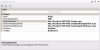
What value has the property PbxDeploymentUri for the project? You can check it in the Properties Window after selecting the project in the Project Explorer Window.
 
I've attached a screen grab.
 

Attachments

  • VAD_settings.jpg
    VAD_settings.jpg
    28.1 KB · Views: 4,961
The PbxConfigurationPort should be 5485. The port number 5481 is for the URIs, because that's where the web server is listening for requests. But the configuration server listens in 5485.

Try changing that and let me know.
 
Status
Not open for further replies.