- Joined
- Feb 21, 2019
- Messages
- 168
- Reaction score
- 41
Enterprise v18.0 (Build 965) - Windows 2019 Server
Changed domains, but have the internal FQDN still show the old domain.
Backed up the 3CX server (no license info included) and removed 3CX server program.
Unlinked the account through Customer portal.
Installed the same version of 3CX server, used the backed up file, gave the new FQDN and cert then completed the install.
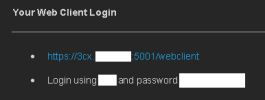
Host is up and running on the new FQDN, but when I send out a Welcome Email to an extension, it has the old FQDN in the "Inside the Office" part of the email and config. This is causing the softphones to not register as it cannot reach that host any longer.
Checked Networking (Server and Extension) and Parameters. There is no reference to the old FQDN that I can see, just the new one.
I have 12 hours to fix this before the staff come into work or I have to roll back to the backup.
Any ideas? Cheers.
Changed domains, but have the internal FQDN still show the old domain.
Backed up the 3CX server (no license info included) and removed 3CX server program.
Unlinked the account through Customer portal.
Installed the same version of 3CX server, used the backed up file, gave the new FQDN and cert then completed the install.
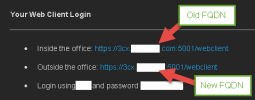
Host is up and running on the new FQDN, but when I send out a Welcome Email to an extension, it has the old FQDN in the "Inside the Office" part of the email and config. This is causing the softphones to not register as it cannot reach that host any longer.
Checked Networking (Server and Extension) and Parameters. There is no reference to the old FQDN that I can see, just the new one.
I have 12 hours to fix this before the staff come into work or I have to roll back to the backup.
Any ideas? Cheers.