Solved EdgeMarc SBC - 3CX Web Client and Smart Phone Apps

Status
Not open for further replies.

amir_

Premier Customer
Joined
Aug 7, 2020
Messages
185
Reaction score
46
Hello Internets,

We run Debian 16.0.8.9 in the following configuration:

SIP TSP >>> EdgeMarc SBC >>> 3CX >>> Phones

We have inbound and outbound calling working fine thru the EdgeMarc. What I'm not able to do is get my 3CX app to register on iPhones and presumably Androids ( I've not tested the 3CX Android app).

Has anyone done this with an EdgeMarc SBC that would be willing to divulge what magic they used to make it work?

TIA,

Amir
 
Hello Internets,

We run Debian 16.0.8.9 in the following configuration:

SIP TSP >>> EdgeMarc SBC >>> 3CX >>> Phones

We have inbound and outbound calling working fine thru the EdgeMarc. What I'm not able to do is get my 3CX app to register on iPhones and presumably Androids ( I've not tested the 3CX Android app).

Has anyone done this with an EdgeMarc SBC that would be willing to divulge what magic they used to make it work?

TIA,

Amir
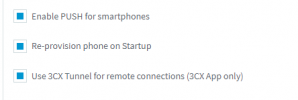
It must be some magical combination of:

EdgeMarc GUI
>>Security>>HTTPS Configuration>>Alternate HTTPS Port

EdgeMarc GUI
>>Network>>NAT>>Port Forwarding

EdgeMarc GUI
>>Network>>Pass-Through Rules
 
Mobile apps connect directly to the 3CX server using the 3CX tunnel port (port 5090 tcp and udp), so make sure you allow this port thru on your firewall. (port forwarding)

You also need to allow the https port thru (port 443, or 5001) for presence info,

More info on ports - https://www.3cx.com/docs/manual/firewall-router-configuration/
 
Last edited:
  • Like
Reactions: amir_
Mobile apps connect directly to the 3CX server using the 3CX tunnel port (port 5090 tcp and udp), so make sure you allow this port thru on your firewall. (port forwarding)

You also need to allow the https port thru (port 80, or 5001) for presence info,

More info on ports - https://www.3cx.com/docs/manual/firewall-router-configuration/
Thanks.

I've updated our EdgeMarc Port Forwarding as follows and 3CX iPhone app still doesn't register:

Protocol​
WAN Intf IP​
WAN Intf Mask​
WAN Port​
LAN IP​
LAN Port​
tcp​
WAN_IP​
WAN_SUBNET​
5090​
10.10.0.44​
5090​
udp​
WAN_IP​
WAN_SUBNET​
5090​
10.10.0.44​
5090​
tcp​
WAN_IP​
WAN_SUBNET​
5001​
10.10.0.44​
5001​
tcp​
WAN_IP​
WAN_SUBNET​
443​
10.10.0.44​
443​
tcp​
WAN_IP​
WAN_SUBNET​
5000​
10.10.0.44​
5000​
 
Under the extension settings - phone provisioning - 3CX app , can you check these settings

1618418353797.png


Extension settings - Options , this is unticked

1618418414002.png


Also delete any blacklisted IP's
 
  • Like
Reactions: amir_
Under the extension settings - phone provisioning - 3CX app , can you check these settings

View attachment 21604


Extension settings - Options , this is unticked

View attachment 21605


Also delete any blacklisted IP's
Yep - those must be defaults because my extension is exactly how you are requesting and my iPhone just times out after scanning the QR code.
 
Does the firewall checker pass successfully?

I'll be sending you a PM for additional information.
 
Hi Chris.

That is exactly what I asked our consultant to investigate. We will work to get 3CX to pass it's firewall check THRU the Edgemarc SBC.

Thanks,

Amir
 
  • Like
Reactions: ChrisC_3CX
HA! We resolved it. It was asymmetric routing. 3CX was default routing the traffic it received from the SBC - and asymmetrically sending it out our DATA path thru our data firewall - rather than returning it to the SBC.

We created a default route at the 3CX linux CLI to default BACK to the SBC and now have the voice path IN / OUT of our network traversing the SBC exclusively.

iPhone and Android apps and Web apps immediately registered and became happy!
 
  • Like
Reactions: ChrisC_3CX
Glad to hear you got this resolved!
 
Status
Not open for further replies.

Forum statistics

Threads
111,974
Messages
590,081
Members
164,899
Latest member
mazet
