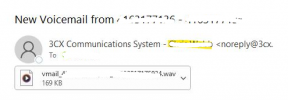
chrisrwebb Silver Partner Joined Feb 8, 2019 Messages 3 Reaction score 0 Aug 17, 2023 #1 The issue is the yellow highlighted is coming up with the wrong name. How and where in the set up did we go wrong for our cleint?
The issue is the yellow highlighted is coming up with the wrong name. How and where in the set up did we go wrong for our cleint?
Alejandro_3CX Staff member 3CX Support Joined Dec 6, 2016 Messages 1,737 Reaction score 892 Aug 17, 2023 #2 That highlighted in yellow is the company name. Please access to the pbx management console ---- go to settings ---- license ---- click on edit --- edit the company name and apply the settings. Once done click on Refresh License Key Information, and give it a try. Reactions: Evolute IT and PanagiotisL_3CX
That highlighted in yellow is the company name. Please access to the pbx management console ---- go to settings ---- license ---- click on edit --- edit the company name and apply the settings. Once done click on Refresh License Key Information, and give it a try.