- Joined
- Feb 5, 2024
- Messages
- 20
- Reaction score
- 9
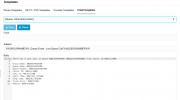
We use this email notification which goes to a parser to open up a "New Business Enquiry" on our CRM if we lose a call from a Queue, it works quite well.
However we have 2 call Queues for this line, a focused call queue which is the first one that rings for our new enquiries number, but that is limited to 15 seconds, then it fails to an Overflow call queue with more staff in it to take the call if the caller has been waiting over 15 seconds.
The problem is when a call moves to the overflow queue, the first queue considers it lost and sends the email which sets up the CRM case. we don't want a case unless we weren't able to answer the call (the caller gave up waiting or got disconnected).
I wondered is there a field I can put in this email template to tell us what happened to the call (Terminated by XXX, Transferred to XXX), so our parser knows if it should open a new case for us or not.
Or even just the amount of time the caller was waiting when it was lost, because if its exactly 15 seconds then it was likely transferred to overflow.
I experimented adding in variables found in other email templates but they all came through as blank.
Or a different way to trigger this email using a call flow based on if the call got answered by an agent or not? I cant seem to find a way because once the call is passed to the Queue the call flow has finished with it.
Short term I have had to add more users to the focused group and stop it overflowing so we only use 1 queue which is far from ideal.
However we have 2 call Queues for this line, a focused call queue which is the first one that rings for our new enquiries number, but that is limited to 15 seconds, then it fails to an Overflow call queue with more staff in it to take the call if the caller has been waiting over 15 seconds.
The problem is when a call moves to the overflow queue, the first queue considers it lost and sends the email which sets up the CRM case. we don't want a case unless we weren't able to answer the call (the caller gave up waiting or got disconnected).
I wondered is there a field I can put in this email template to tell us what happened to the call (Terminated by XXX, Transferred to XXX), so our parser knows if it should open a new case for us or not.
Or even just the amount of time the caller was waiting when it was lost, because if its exactly 15 seconds then it was likely transferred to overflow.
I experimented adding in variables found in other email templates but they all came through as blank.
Or a different way to trigger this email using a call flow based on if the call got answered by an agent or not? I cant seem to find a way because once the call is passed to the Queue the call flow has finished with it.
Short term I have had to add more users to the focused group and stop it overflowing so we only use 1 queue which is far from ideal.