Email Server

prb1412

Premier Customer
Joined
Feb 8, 2023
Messages
44
Reaction score
5
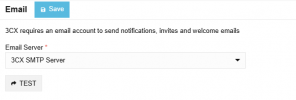
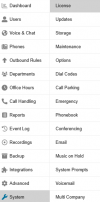
I have changed my email server (System/Email) to use 3cx SMTP. For some reason the system keeps updating this setting to use my corporate address. We use 365 Integration, and I am the system owner. How do I fix this?
 
can you clarify what you mean by "updating this setting to use my corporate address"

which setting?

changing your SMTP server should not change anything other then whats yeeting you mail

is your extension address changing or the sending address via SMTP?
 
This setting that sends notifications.
1756220612248.png
 
Go to System > Alerts > Notification Delivery
 
I do not have that option

1756223933878.png
 
Youre likely on an earlier release.

so when you select 3CX's SMTP server and hit apply, youre saying that emails are still sent from your 365? They should come from a noreply@3cx address.
 
When I select 3cx SMTP Server and apply, emails are sent from noreply correctly. Then when I check back a day or so later they are sending from M365 again. I am trying to figure out what is triggering the change.
 
Ah ok. I’ve seen this happen on initial setup of 365 with the wizard but I doubt you’re doing that everyday manually.
What options have you got selected to sync with 365?
 
  • Like
Reactions: KyriacosS_3CX
You could always create a shared mailbox for 3cxnotifications@ in your 365 and then use the UPN from this account to send email. It’s what I do. Doesn’t need a license
 
Last edited:
  • Like
Reactions: KyriacosS_3CX

Forum statistics

Threads
111,956
Messages
589,927
Members
164,858
Latest member
MichaelRussell3