


- Joined
- Nov 25, 2015
- Messages
- 244
- Reaction score
- 168
Hello,
Today someone had to call emergency services (112) and we really would like to request some additional functionality.
Now, you can create multiple rules, but the notifications are applied in general:
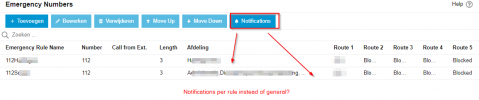
Someone at Department B called 112.
Therefore, the group leaders of the group were notified by chat message. However, those group leaders didn't see the chat message right away and didn't respond quickly.
If however, I setup a notification rule to call a certain Ring Group, that Ring Group will also be called when someone from Department C or D makes a 112-call.
That's not required: the people from Department C or D do not need to be notified via a call, because it's not in their department.
There are separate company emergency responders per department.
We could also customise the prompt, change the email addresses that get an email depending on which department made the 112 call.
I hope this makes sense.
It would help with notifying the correct company first responders.
(Extra info: Right now, a call will go out to ALL company first responders. They are in a Ring Group. The prompt then says 'someone in the company has called 112'. They have no idea who. They can then look at their computer in the 3CX chat, but it's entirely possible they did not get a chat message because that is set to 'notify department members'. They can then assume someone outside their department called because they did not get a chat message. But that's not how it works: they start wondering if there is something wrong with the chat function and start calling people to determine who made the 112 call. The email function could help a little because I could put in the same email addresses that are in the Ring Group as well. But email is often quite slow. But this is all not ideal)
Today someone had to call emergency services (112) and we really would like to request some additional functionality.
Now, you can create multiple rules, but the notifications are applied in general:
Someone at Department B called 112.
Therefore, the group leaders of the group were notified by chat message. However, those group leaders didn't see the chat message right away and didn't respond quickly.
If however, I setup a notification rule to call a certain Ring Group, that Ring Group will also be called when someone from Department C or D makes a 112-call.
That's not required: the people from Department C or D do not need to be notified via a call, because it's not in their department.
There are separate company emergency responders per department.
We could also customise the prompt, change the email addresses that get an email depending on which department made the 112 call.
I hope this makes sense.
It would help with notifying the correct company first responders.
(Extra info: Right now, a call will go out to ALL company first responders. They are in a Ring Group. The prompt then says 'someone in the company has called 112'. They have no idea who. They can then look at their computer in the 3CX chat, but it's entirely possible they did not get a chat message because that is set to 'notify department members'. They can then assume someone outside their department called because they did not get a chat message. But that's not how it works: they start wondering if there is something wrong with the chat function and start calling people to determine who made the 112 call. The email function could help a little because I could put in the same email addresses that are in the Ring Group as well. But email is often quite slow. But this is all not ideal)
Last edited:


