- Joined
- Aug 20, 2019
- Messages
- 1,147
- Reaction score
- 1,285
To clients utilizing VoiceMeUp SIP Trunk in 3CX PBX,
an increasing number of our clients are reaching out to us to inquire when they will be able to use SMS/MMS functionalities, powered by VoiceMeUp, with their Hosted or On Premise 3CX PBX system (Except SMB/StartUP) .
In reality, this feature has been available for several months already.
Some time ago, 3CX opened up the possibility for all SIP providers, such as VoiceMeUp, to integrate with their SMS API.
We immediately adjusted our Webhook and API to be compatible with the generic template offered by 3CX.
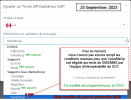
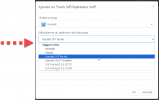
Regarding the VoiceMeUp (SIP Trunk template) on 3CX, it's important to note that it does not include a tab for SMS configuration. To use SMS feature, it's necessary use the Generic SIP Trunk Template provided by 3CX.
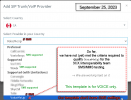
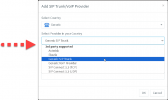
If you're already using our template that doesn't include this tab, a reconfiguration will be required to Generic SIP Trunk Template.
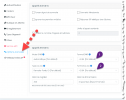
To simplify this process, we've developed a script called "Hotfix SMS", which automates all the necessary changes by interacting with the 3CX Dashboard APIs.
Reminder (this is not an automatic process):
DID numbers should be formatted in +E.164;
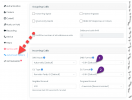
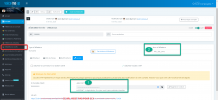
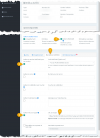
#1. In the SMS tab (Generic Template) enter your API key (See number 1 in the image), which can be retrieved from the VoiceMeUp portal.
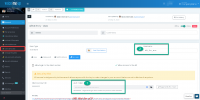
#2. In 3CX , Enter the following URL in the field provided for this purpose:
Replace "REPLACE-BY-USERNAME" with your VoiceMeUp username ( See number 2 in the image above ).
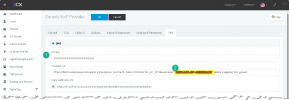
#3. Ensure that the SMS service is enabled and configurer for the concerned DID on the VoiceMeUp portal.
an increasing number of our clients are reaching out to us to inquire when they will be able to use SMS/MMS functionalities, powered by VoiceMeUp, with their Hosted or On Premise 3CX PBX system (Except SMB/StartUP) .
In reality, this feature has been available for several months already.
Some time ago, 3CX opened up the possibility for all SIP providers, such as VoiceMeUp, to integrate with their SMS API.
We immediately adjusted our Webhook and API to be compatible with the generic template offered by 3CX.
Regarding the VoiceMeUp (SIP Trunk template) on 3CX, it's important to note that it does not include a tab for SMS configuration. To use SMS feature, it's necessary use the Generic SIP Trunk Template provided by 3CX.
If you're already using our template that doesn't include this tab, a reconfiguration will be required to Generic SIP Trunk Template.
To simplify this process, we've developed a script called "Hotfix SMS", which automates all the necessary changes by interacting with the 3CX Dashboard APIs.
Reminder (this is not an automatic process):
DID numbers should be formatted in +E.164;
- In 3CX, DIDs must start with +1
- In VoiceMeUp Peers / SIP Trunks > Advanced Options, Set +E.164 DNIS Format, same for CLI Format
---> The following contains the VoiceMeUp information that must be entered for SMS to work with the 3CX generic SIP trunk Template:
#1. In the SMS tab (Generic Template) enter your API key (See number 1 in the image), which can be retrieved from the VoiceMeUp portal.
#2. In 3CX , Enter the following URL in the field provided for this purpose:
https://clients.voicemeup.com/api/v1.1/json/queue_sms?auth_token={MESSAGING_API_KEY}&username=REPLACE-BY-USERNAME&data_mapping=3cx_generic |
#3. Ensure that the SMS service is enabled and configurer for the concerned DID on the VoiceMeUp portal.
simplicity and reliability
VoiceMeUp is a service offered by Internet Infinity.
Last edited: