Enterprise edition for recording

Eli L

Customer
Joined
Jan 19, 2026
Messages
2
Reaction score
0
So having the system forcing us to allow users to start and stop recordings unless we pay for the enterprise edition, actually can open up a pretty big and ugly can of worms for a company that operates in a state with 2 party recording laws. There is no notification during the call if an employee hits the record button (Call Recording Notification only sends an e-mail to the employee, does not notify the other person(s) on the call).

This could get a company bound up in legal issues if an employee is making recordings without both parties knowing about it. There has GOT to be a solution? We can add the "Call may be recorded for training purposes" notice on the Digital Receptionist, but it doesn't help for employees making outbound calls.

1768836895172.png
 
Sounds like you have a business use case for why you need the enterprise edition. Good news is that you can buy it today.

There has GOT to be a solution?
Yes, it's called Enterprise Edition.
 
  • Like
Reactions: N_G
We have 5 employees. Can't justify the enterprise pricing for a feature that should realistically be off by default and can only be turned on by the enterprise edition purchase. We will have to just resolve the issue through training.
 
Come on, you cannot be serious. As a business owner you spend money in 1000 different ways. I can say this because I don't work for 3CX. The price difference between an 8SC Pro and Enterprise is $18.75 a month. If you are really concerned about legal ramifications, then this is less money than what you pay for toilet paper for a business. Spend the money. Don't be penny-wise and pound-foolish.
 
Come on, you cannot be serious. As a business owner you spend money in 1000 different ways. I can say this because I don't work for 3CX. The price difference between an 8SC Pro and Enterprise is $18.75 a month. If you are really concerned about legal ramifications, then this is less money than what you pay for toilet paper for a business. Spend the money. Don't be penny-wise and pound-foolish.

It'll cost less then the legal fees when employee forgets to stop recording
 
  • Like
Reactions: MarcosV_3CX
I must have been having a challenging day. Perhaps you should look at our 3CX Recording Beep application. It has a number of features, but one is a quiet little "beep" that reminds/notifies all participants that the call is being recorded. Perhaps that would help with your concerns about consent.
 
I'm confused as well. As the feature list also mentions that being able to start and stop recordings is a Enterprise editon options.
I've always been of the idea that you couldn't click on start and stop with the pro version.

I know that in V18 this was disabled by default. Which now in V20 is enabled by default?


1773674943251.png

It's important that we can give the correct info to our customers. Thanks for giving clarification on this.
 
I think this means that the user is unable to start / stop if it has been defined by admin.
 
I'm confused as well. As the feature list also mentions that being able to start and stop recordings is a Enterprise editon options.
I've always been of the idea that you couldn't click on start and stop with the pro version.

I know that in V18 this was disabled by default. Which now in V20 is enabled by default?


View attachment 51233

It's important that we can give the correct info to our customers. Thanks for giving clarification on this.


Regarding the mentioned feature to start and stop call recordings, as you correctly mentioned, in v20 this setting is enabled by default. This means that users can start or stop the recording of a call when using a Professional license key.

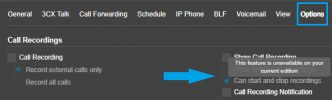
This setting can be found by navigating to Admin > Users > Editing the relevant user > Options tab. Under the Call Recordings item, you will see the option that allows enabling or disabling this feature when the system is assigned an Enterprise license key.

If your system is using a Professional license key, when you hover your mouse over this option you will see the message 'This feature is unavailable on your current edition', as shown in the attached image.
 

Attachments

  • Screenshot 2026-03-16 140953.png
    Screenshot 2026-03-16 140953.png
    19.6 KB · Views: 7
Regarding the mentioned feature to start and stop call recordings, as you correctly mentioned, in v20 this setting is enabled by default. This means that users can start or stop the recording of a call when using a Professional license key.

This setting can be found by navigating to Admin > Users > Editing the relevant user > Options tab. Under the Call Recordings item, you will see the option that allows enabling or disabling this feature when the system is assigned an Enterprise license key.

If your system is using a Professional license key, when you hover your mouse over this option you will see the message 'This feature is unavailable on your current edition', as shown in the attached image.
Thanks for the clarification. This feature was still stuck in V18 in my head ;)
 

Latest Posts

Forum statistics

Threads
112,283
Messages
591,697
Members
165,406
Latest member
ARKC