Error "Failed With 403" with X3SG Pro

Status
Not open for further replies.

Paul-2024

Customer
Joined
Feb 16, 2024
Messages
48
Reaction score
12
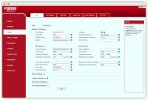
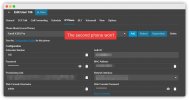
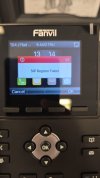
I have two of those phones in the office, the first one worked without a hitch, but the second one no matter how many times I reset and re-provision always ends up with "Failed With 403".
I tried recreating the extension, setting new a brand new extension number, nothing works on this unit.
So I went and ordered a new one from Amazon, got it this morning and for my surprise the same issue happens after provisioning the unit, "Failed With 403".
At this point I don't know what else to do, I have all units updated to the latest version.
 

Attachments

  • 3CX2 (1).jpg
    3CX2 (1).jpg
    81.7 KB · Views: 16
  • 3CX2 (2).jpg
    3CX2 (2).jpg
    108.3 KB · Views: 16
Have you checked that the firmware is up-to-date for the latest supported version by 3CX?
 
Have you checked that the firmware is up-to-date for the latest supported version by 3CX?
Don't recall, do you have a link? I have two other phone with the same firmware version working,
 
Download the firmware file from here and update manually in the phone's UI: https://www.3cx.com/docs/phone-firmwares/

Then, factory reset and retry provisioning.
Tks man, did that.

1. Factory reset, confirmed with login admin/admin
2. Did firmware downgrade.
3. Deleted the phone and added again to extension.
4. Rebooted the handset.
5. Confirmed it provisioned since I had to use the extension password to login to phone UI this time.
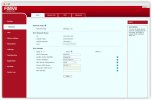
6. Still errors out with 403.
 

Attachments

  • 3CX3.jpg
    3CX3.jpg
    80 KB · Views: 8
  • 3CX2.jpg
    3CX2.jpg
    53.2 KB · Views: 9
  • 3CX1.jpg
    3CX1.jpg
    57 KB · Views: 9
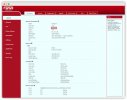
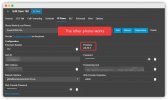
Interesting enough the second phone in the office fails to display its firmware version under the extension page in 3CX, unlike the other phone.
 
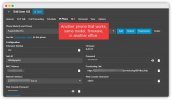
You assigned them as local phones. That would only work if the PBX, and the phones, are literally on the same LAN.

Are they or is your PBX hosted by us and the phones installed at the office?
 
  • Like
Reactions: Evolute IT
You assigned them as local phones. That would only work if the PBX, and the phones, are literally on the same LAN.

Are they or is your PBX hosted by us and the phones installed at the office?
Now you've got me, how does that assignment works? I only created a new extension and entered the phone model + mac address, I had no choice to change from internal to external, but why the other phones work despite displaying as local? (I have another phone in another office which also runs that firmware and shows as local).

It's hosted by 3CX and the phones installed in two different offices.
 

Attachments

  • 3CX4.jpg
    3CX4.jpg
    63.7 KB · Views: 7
entered the phone model + mac address, I had no choice to change from internal to external
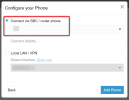
Check again, after you press next, it will ask you how to connect it.

In your type of installation, the only valid answer is "Connect via SBC/ router phone".

1723129289161.png

At the location where the phones reside, you will need either an SBC, or a router phone.

Do you have either of those at that location? If not, now is the time to install one.
https://www.3cx.com/docs/3cx-tunnel-session-border-controller/


but why the other phones work despite displaying as local?
I can answer that later, but first focus on getting an SBC up and running if you havent got one at the specific location where the phones reside.
 
  • Like
Reactions: Evolute IT
Check again, after you press next, it will ask you how to connect it.

In your type of installation, the only valid answer is "Connect via SBC/ router phone".

View attachment 43075

At the location where the phones reside, you will need either an SBC, or a router phone.

Do you have either of those at that location? If not, now is the time to install one.
https://www.3cx.com/docs/3cx-tunnel-session-border-controller/


I can answer that later, but first focus on getting an SBC up and running if you havent got one at the specific location where the phones reside.
Hi John, the majority of our phones are softphones, the official app for Windows, we only have 3 physical units.

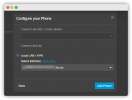
As of that screenshot you've sent, you're right LAN shows up there, only problem is that on my installation SVC/router option is disabled/read-only which could be because I have no SBC instances right?

In any case would the SBC be overkill for us with only 3 phones? Also how can we explain that the other 2 extensions still work despite being displayed as LAN but being in remote locations?
Thank you

1723130680558.png
 
I swapped the network cables between the two phones, mind you this is already a second unit, and the phone that used to work fine still works no problem, the one with the error continues to display the error.

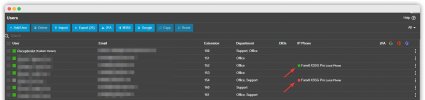
You can see attached a list of extensions with both phones appearing as "Local" and only one of them working, we have a third one but in the other office which is closed today, but also works.
 

Attachments

  • Screen.jpeg
    Screen.jpeg
    77.8 KB · Views: 8
  • Extensions.jpg
    Extensions.jpg
    88.6 KB · Views: 9
Installing SBC in the network and setting it up fixed it, now the question now is how the heck the other two phones worked without doing this...
Thank you
 
[...]

In any case would the SBC be overkill for us with only 3 phones? Also how can we explain that the other 2 extensions still work despite being displayed as LAN but being in remote locations?

Numerous theories can explain why it works despite your PBX being remote and without a VPN, particularly if you’ve configured it locally but chose the FQDN as the server.

Even if STUN is not enabled, it could still work if your firewall assists with NAT traversal, possibly through a protocol like SIP ALG, for instance.
In any case, DNAT, with or without SIP ALG/SIP HELPER (name them all), are highly unpredictable mechanisms. Each router brand handles them differently, with numerous parameters that can be modified, and each firmware version of the phone and router can lead to different behaviors. Although you’ve tried to replicate your configuration as closely as possible, everything ultimately relies on dynamic mechanisms. NAT traversal is undoubtedly the biggest enemy of IP telephony. The SBC is designed to address this issue—it acts as a tunnel, centralizing all traffic in one place and includes additional mechanisms to tackle the challenges posed by routers.

Believe me, even for a single phone, an SBC is not overkill. More and more phone manufacturers are including the SBC function (referred to as ROUTER PHONE) in their devices. In some scenarios, even with only one phone installed, we still configure it in "router phone" mode to handle NAT traversal.
 
Glad you got it sorted Paul, make sure they are all reset and reprovisioned cleanly via the SBC for maximum reliability, even the ones that appeared to work as local. Now why did they work?

1. You had a hand in it to some degree by disabling this option ;)
1723199915867.png
Now that you have an SBC, go and turn it back on to prevent insecure connections from those extensions.

2. As Guillaume aptly describes, the phones basically resolved the url of the PBX, and connected directly - yet insecurely and unreliably as you yourself saw with the failure of some.

So when you asked my why some worked and some didn't, you might as well ask me why throwing the dice sometimes gets you a six and sometimes gets you a one ;)

Don't rely on luck my friend, use your SBC which encrypts traffic via the 3CX tunnel, and is designed to pass safely and reliably through firewalls so that all -not just some- of the phones will work as intended.


PS: did you know that some models have a built in SBC? Look for models marked as router phone here if you are ever in the market for devices.
 
So when you asked my why some worked and some didn't, you might as well ask me why throwing the dice sometimes gets you a six and sometimes gets you a one ;)
I love your analogy!
I'm buying the reproduction rights,
I'll reuse it in the future. :p
 
Hey guys, thanks for the detailed explanation and for the solution, good stuff, I appreciate it.
 
Hey guys, thanks for the detailed explanation and for the solution, good stuff, I appreciate it.
 
Status
Not open for further replies.

Members Online Now

Forum statistics

Threads
111,835
Messages
589,288
Members
164,665
Latest member
dominik.pepel