Error "Sessionid not found" in Upload file feature

Status
Not open for further replies.

minh zero

Forum User
Joined
Mar 31, 2020
Messages
10
Reaction score
0
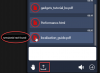
When I used 3cx webmeeting to exchange jobs with clients, I used the Upload file feature to share documents with colleagues, but when I uploaded the document, 3cx webmeeting reported this error.
2020-04-01_8-25-01.png
So what did I configure wrong?
 
Hi there,

Could you let us know which server you're connected to? You can find this by clicking on the Settings > Info section and copying the server name here.
 
Dear @LeonidasG ,

Information about the server is as follows:
Server info:Singapore #1 - as012-sgp.3cx.net (13.250.89.194) - SG Singapore Singapore - Version: 10.5.10.26204/Linux
 
I have tried switching to another server. For example:
Server info:Taiwan - as001-tw.3cx.net (34.80.90.26) - TW Taiwan Taipei - Version: 10.5.10.26204/Linux

But it still failed.
 
Status
Not open for further replies.

Forum statistics

Threads
111,973
Messages
590,078
Members
164,896
Latest member
sameage