Event ID: 50011 - SSL Certificate renewal has been failed.

Status
Not open for further replies.

fostek-software

Customer
Joined
Nov 18, 2019
Messages
7
Reaction score
0
SSL Certificate renewal has failed. Error: SSL certificate failed due to network conditions. Unable to reach Certificate Issuing Servers. We'll try again in a couple of hours.

This error happened this morning with our 3CX system. Can I get some assistance with diagnosing the issue and finding the fix?

I tried looking into the logs, but it seems like we've never had the certificate renewed.

"RenewCertificates": true, (this is set)

This happens too: Finish updating certificates. Updated 0 certificates

Any help?
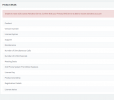
 
What is your version of 3cx, including build number
 
1650548367341.png
I am getting this when I look into the version number.

Version: 18.0 Update 1 (Build 237) (Found it on the dashboard)
 
Why does it need to be reinstalled? Just maintenance things?

We have a second 3cx instance and it works fine.
 
You can of course take a look in the Management Console's Updates section to see if you have any available updates for U2 and update if you do. If not you will have to re-install because the version you are currently running will not be able to activate and update due to the fact that it has the old activation FQDN hardcoded: https://www.3cx.com/blog/releases/fqdn-endpoint-change/
 
@ChrisC_3CX

I do have an update available, will this resolve this issue?
 
@ChrisC_3CX

I do have an update available, will this resolve this issue?

If the update gets the system to 3CX Version 18, Update 3 FINAL, Build 18.0.3.450 February 2022, yes it will resolve the issue.

You may have to run updates a few times to install the necessary updates
 
Got it, I will keep this thread posted.

Thanks.
 
Hello @ChrisC_3CX, I updated and I was going to just wait and see if it throws another error or not, but is there a way to check if the certificate was renewed successfully after the update?

Now I am 18.0 (Build 461). Thanks.
 
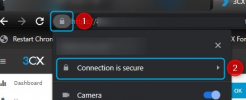
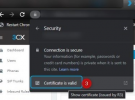
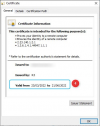
You can check the actual ssl certificate validity period:

Access the 3CX MC in Google Chrome:

1650575441381.png


1650575561125.png


1650575508312.png


If it hasn't already just give it a day or two.


Also, do make sure the PBX can activate the License now by going to "Settings >> License" and clicking on "Refresh License Key Information"
 
Status
Not open for further replies.

Forum statistics

Threads
111,974
Messages
590,083
Members
164,900
Latest member
Silent_Guru