Extension being automatically "disabled by Admin" repeatedly

Status
Not open for further replies.

Christian SCG

Premier Customer
Joined
Dec 21, 2021
Messages
24
Reaction score
6
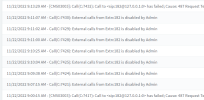
Just today one of our users had trouble dialing out and when I checked their settings, "Disable External Calls" was checked. I'm the only admin working today, and I didn't check it. Seemed very odd, so I unchecked it and they were again able to make outbound calls. Then about three hours later, they experienced the same issue. I checked their user settings, and "Disable External Calls" was again checked. I did not do this and I am the only 3CX Admin working today. Looking at the Activity Logs, I see a block of "External calls from Extn:182 is disabled by Admin. I found a few posts about office hours triggering this, but we don't block calls outside of office hours. Are there any automatic scenarios that trigger disabling External calling? I've used 3cx since v13 and I've never seen this behavior.
1669153348151.png
 
Syncing with a PMS (Hotel Services?) maybe?

Is it linked to a 365 user that is disabled?
 
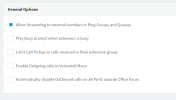
The only option is under General Settings "Automatically disable Outbound calls on all Ports outside Office hours" but this will apply for all extensions. Have you checked in the Audit Log as well?
 
"Automatically disable outside calls on ports outside Office hours" is NOT enabed.
1669215274717.png

Going through the audit logs I can see where I *unchecked* "Disable External calls" for this user, but there is no log for what checked it. Even curiouser I just decided to restart the System service and THAT checked their "Disable External calls" so I unchecked it again and restarted the DB service which ALSO checked their "Disable External calls" for the same user. Again, nothing in the audit logs other than the service restarts and my UNCHECKING of that option.
 
I had this issue for a user. Couldnt figure it out so deleted it and recreated it.
 
Hi

I'm experiencing exactly the same issue with one of my customers. I even went so far as to try to look into some logs to see if there is anything that procs the 3CX to disable the extension, but the only thing I could find is that the user (which is using the Android APP) connects from two different IP's (the 4G IP and the Office IP)

Is there some automatic exploit protection for the users we can't see in the Management Console? Only thing I can think of is that 3CX sees that the same session ID is coming from two IP's and blocks the user from being able to call out.
 
Only thing that resolved it for me was recreating the extension. So far it's only happened that one time and recreating the extension with the exact same settings fixed the issue.
 
  • Like
Reactions: Brand0n
Status
Not open for further replies.

Forum statistics

Threads
111,974
Messages
590,081
Members
164,899
Latest member
mazet