- Joined
- May 29, 2019
- Messages
- 25
- Reaction score
- 4
Hello,
I have a new 3CX pbx and I have successfully created an incoming call queue. I have configured my 3cx client so that when I press the "Q" button it logs me in and out of the queue as expected.
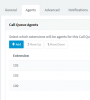
I have now purchased a GXP-1620 deskphone. I have created a new extension and with some mssing about managed to provision the deskphone to be this extensions phone. But when I go back to my 3cx client and look at the call queue my new extension is not logged into the queue.
I have tried dialling *62 from the deskphone and I get a voice message saying I'm now logged into the queue. But when I look at the queue the extension is NOT logged in.
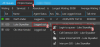
I have gone to the webclient page for the new extension and logged in. I go to the switchboard tab and there is a big "Q" button I can press but despite it changing colour, the queue still says I am not logged into it.
Anyone able to shed any light on how to get the new deskphone to be logged into the queue?
Thanks in advance
I have a new 3CX pbx and I have successfully created an incoming call queue. I have configured my 3cx client so that when I press the "Q" button it logs me in and out of the queue as expected.
I have now purchased a GXP-1620 deskphone. I have created a new extension and with some mssing about managed to provision the deskphone to be this extensions phone. But when I go back to my 3cx client and look at the call queue my new extension is not logged into the queue.
I have tried dialling *62 from the deskphone and I get a voice message saying I'm now logged into the queue. But when I look at the queue the extension is NOT logged in.
I have gone to the webclient page for the new extension and logged in. I go to the switchboard tab and there is a big "Q" button I can press but despite it changing colour, the queue still says I am not logged into it.
Anyone able to shed any light on how to get the new deskphone to be logged into the queue?
Thanks in advance